Dice Roguelife
AI text roguelike
AIテキストローグライク
주사위가 정한 인생
Dice Roguelife
ダイスが決める人生
주사위가 세계, 종족, 신분, 재능을 정해 주고, AI가 그 삶을 웹소설처럼 들려주는 텍스트 로그라이크예요.
The dice pick your world, race, standing and talent, and an AI tells that life like a web novel. A text roguelike.
ダイスが世界、種族、身分、才能を決め、AIがその人生をWeb小説のように語るテキストローグライクです。
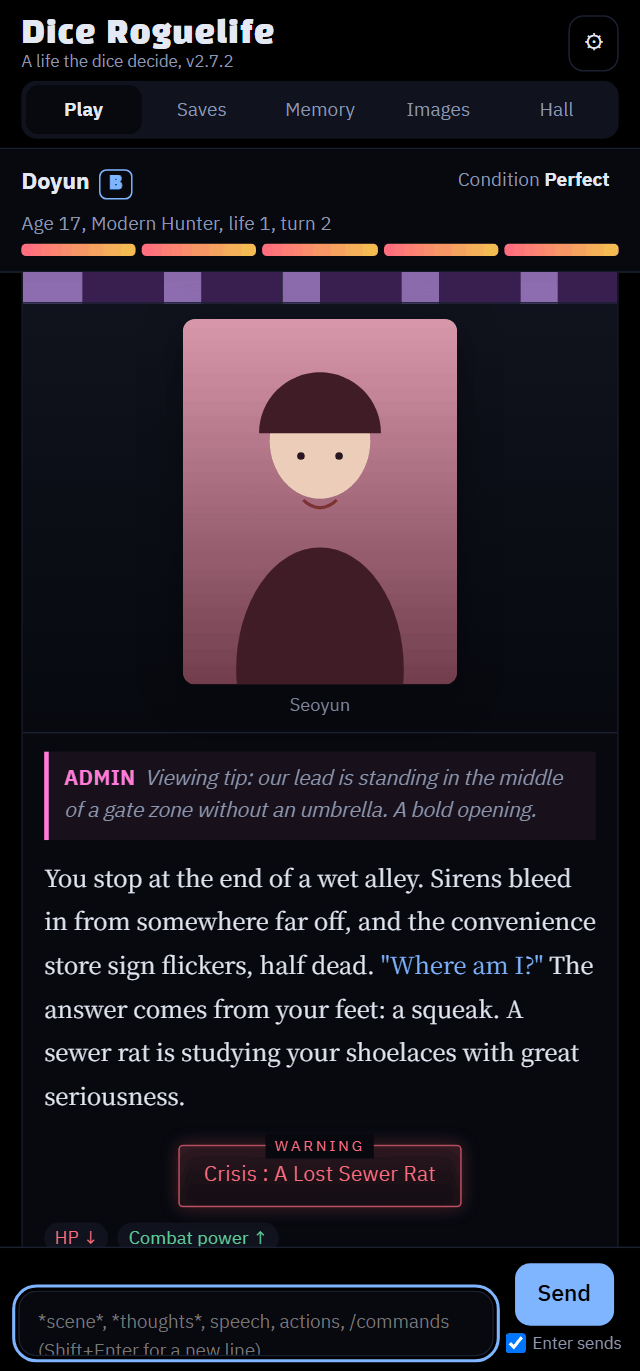
설치와 업데이트
Install and update
インストールとアップデート
Claude 앱에서 해요. 폰도 돼요.
Done in the Claude app. Works on a phone too.
Claudeアプリで行います。スマホでもできます。
준비 (처음 한 번만)
Before you start (once)
準備(最初に一度だけ)
- 폰 브라우저(앱 말고)로 claude.ai 설정 → 기능(Capabilities)을 열어요. 로그인이 안 되어 있으면 먼저 로그인하세요.
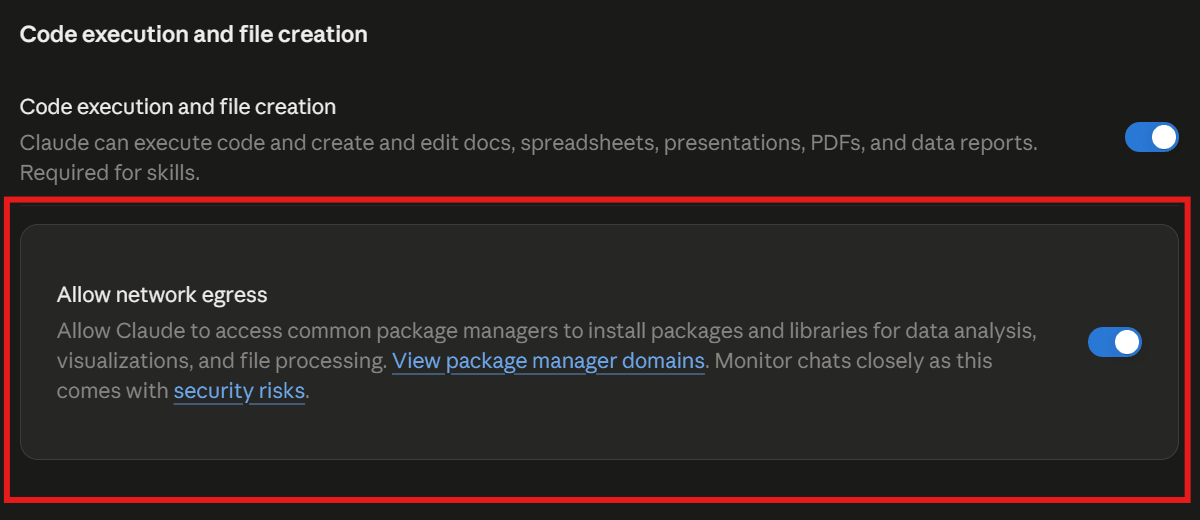
- 코드 실행 및 파일 생성을 켜요.
- 네트워크 허용(Allow network egress)을 켜요. 이 항목은 앱 설정에는 없어서 브라우저에서만 켤 수 있어요. 한 번 켜면 앱에도 그대로 적용돼요. 계정에 따라 기본으로 꺼져 있어요.
- 앱으로 돌아와 새 대화를 열어서 진행하세요. 이미 열려 있던 대화에는 바뀐 설정이 적용되지 않아요.
- 새 대화에서도 막히면 설정이 반영되기까지 몇 분 걸릴 수 있어요. 5분쯤 뒤에 다시 시도하세요.
- In your phone's browser (not the app), open claude.ai Settings → Capabilities. Sign in first if you aren't.
- Turn on Code execution and file creation.
- Turn on Allow network egress. This option isn't in the app's settings, so you can only turn it on in a browser. Once it's on, it applies to the app too. Some accounts have it off by default.
- Go back to the app and start a new chat. Chats that were already open don't pick up the new setting.
- If a new chat is still blocked, the setting can take a few minutes to apply. Try again in about 5 minutes.
- スマホのブラウザ(アプリではなく)で claude.ai 設定 → 機能(Capabilities) を開きます。ログインしていない場合は先にログインしてください。
- コード実行とファイル作成をオンにします。
- ネットワークアクセスを許可(Allow network egress)をオンにします。この項目はアプリの設定にはないので、ブラウザでしかオンにできません。一度オンにすればアプリにも反映されます。アカウントによっては初期状態でオフです。
- アプリに戻って新しいチャットを開きます。前から開いていたチャットには新しい設定が反映されません。
- 新しいチャットでもブロックされる場合、設定の反映に数分かかることがあります。5分ほど待ってからもう一度試してください。
설치
Install
インストール
새 대화에 아래 문구를 그대로 붙여 넣으세요.
Paste this into a new chat as is.
新しいチャットに次の文をそのまま貼り付けてください。
아래 링크의 최신 버전 dice-roguelife.html 파일을 받아서, 내 아티팩트로 게시해 줘.
db, sample, user, assets, downloads 기능이 모두 필요해.
https://github.com/wonjoonSeol-WS/dice-roguelife/releases/latest/download/dice-roguelife.html
Download the latest dice-roguelife.html from the link below and publish it as my artifact.
It needs the db, sample, user, assets and downloads capabilities.
https://github.com/wonjoonSeol-WS/dice-roguelife/releases/latest/download/dice-roguelife.html
下のリンクから最新の dice-roguelife.html をダウンロードして、私のアーティファクトとして公開してください。
db、sample、user、assets、downloads の機能が必要です。
https://github.com/wonjoonSeol-WS/dice-roguelife/releases/latest/download/dice-roguelife.html
게시된 링크를 열면 바로 플레이할 수 있어요. 처음 실행할 때 Claude 연결 확인 창이 떠요. 확인(OK)을 눌러야 게임이 Claude를 불러 이야기를 쓸 수 있어요.
Open the published link and play. The first time it runs, Claude asks you to confirm the connection. Tap OK so the game can call Claude to write the story.
公開されたリンクを開けばすぐに遊べます。初めて起動するとき、Claudeが接続の確認を求めます。ゲームがClaudeを呼び出して物語を書けるように、OKをタップしてください。
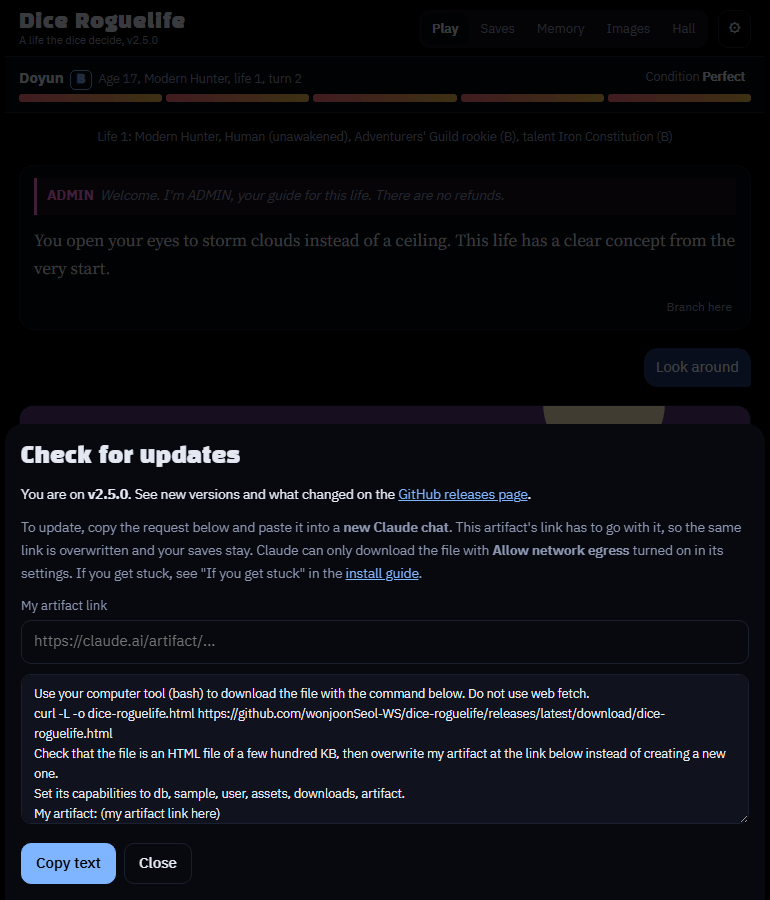
저장 데이터는 아티팩트 링크에 묶여 있어요. 새 아티팩트를 만들면 저장이 빈 채로 시작하니, 꼭 쓰던 링크에 덮어쓰세요. 업데이트하면 화면이 새로고침되니 쓰던 입력은 먼저 보내 두세요. 게임 안 ⚙ 설정 → 업데이트 확인에서도 같은 문구를 만들어 줘요.
Your saves are tied to the artifact link. A new artifact starts with no saves, so always overwrite the link you've been using. Updating reloads the page, so send anything you were typing first. In the game, ⚙ Settings → Check for updates writes the same prompt for you.
セーブデータはアーティファクトのリンクに紐づいています。新しいアーティファクトを作るとセーブは空から始まるので、必ず使っているリンクに上書きしてください。アップデートすると画面が再読み込みされるので、入力中の文は先に送っておきましょう。ゲーム内の⚙ 設定 → アップデートを確認でも同じ文を作ってくれます。
컴퓨터 도구(bash)에서 아래 명령으로 파일을 받아 줘. 웹 읽기(web fetch)는 쓰지 마.
curl -L -o dice-roguelife.html https://github.com/wonjoonSeol-WS/dice-roguelife/releases/latest/download/dice-roguelife.html
받은 파일이 수백 KB짜리 HTML인지 확인한 다음, 새 아티팩트를 만들지 말고 아래 내 아티팩트 링크에 덮어써 줘.
기능은 db, sample, user, assets, downloads, artifact로 맞춰 줘.
내 아티팩트: (여기에 내 아티팩트 링크)
Use the computer tool (bash) to download the file with the command below. Don't use web fetch.
curl -L -o dice-roguelife.html https://github.com/wonjoonSeol-WS/dice-roguelife/releases/latest/download/dice-roguelife.html
Check that the file is an HTML file of a few hundred KB, then overwrite my artifact at the link below instead of creating a new one.
Set its capabilities to db, sample, user, assets, downloads and artifact.
My artifact: (paste your artifact link here)
コンピューターツール(bash)で、下のコマンドを使ってファイルをダウンロードしてください。Web取得(web fetch)は使わないでください。
curl -L -o dice-roguelife.html https://github.com/wonjoonSeol-WS/dice-roguelife/releases/latest/download/dice-roguelife.html
ファイルが数百KBのHTMLファイルであることを確認してから、新しいアーティファクトは作らずに、下の私のアーティファクトのリンクに上書きしてください。
機能は db、sample、user、assets、downloads、artifact にしてください。
私のアーティファクト:(ここに自分のアーティファクトのリンク)
- 맨 아래 줄의 (여기에 내 아티팩트 링크)를 쓰던 아티팩트 주소로 바꿔서 보내세요.
- 새 버전과 바뀐 점은 Releases에서 볼 수 있어요.
- 불안하면 먼저 저장 탭에서 저장 파일을 내보내 두세요.
- Replace (paste your artifact link here) on the last line with the address of the artifact you've been using.
- See what's new in Releases.
- To be safe, export a save file from the Saves tab first.
- 最後の行の(ここに自分のアーティファクトのリンク)を、使っているアーティファクトのアドレスに置き換えて送ってください。
- 新しいバージョンと変更点は Releases で確認できます。
- 念のため、先にセーブタブでセーブファイルを書き出ししておきましょう。
막혔을 때
If you get stuck
うまくいかないとき
- "GitHub가 자동 접근을 막았다"고 하거나 파일을 받지 못했다고 하면 웹 읽기로 받으려 한 거예요. 아래 문구로 다시 보내세요. 컴퓨터 도구(bash)로 받게 하는 문구예요.
- If Claude says "GitHub blocked automated access" or couldn't download the file, it tried web fetch. Send the prompt below instead; it makes Claude download the file with the computer tool (bash).
- Claudeが「GitHubが自動アクセスをブロックした」と言ったり、ファイルをダウンロードできなかったりした場合は、Web取得(web fetch)でダウンロードしようとしています。代わりに下の文を送ってください。コンピューターツール(bash)でダウンロードさせる文です。
설치 (웹 읽기가 막힐 때)
Install (when web fetch is blocked)
インストール(Web取得がブロックされるとき)
컴퓨터 도구(bash)에서 아래 명령으로 파일을 받아 줘. 웹 읽기(web fetch)는 쓰지 마. GitHub가 막아서 실패해.
curl -L -o dice-roguelife.html https://github.com/wonjoonSeol-WS/dice-roguelife/releases/latest/download/dice-roguelife.html
받은 파일이 수백 KB짜리 HTML인지(오류 문구가 아닌지) 확인한 다음,
db, sample, user, assets, downloads, artifact 기능을 켜서 그대로 내 아티팩트로 게시해 줘.
Use the computer tool (bash) to download the file with the command below. Don't use web fetch; GitHub blocks it.
curl -L -o dice-roguelife.html https://github.com/wonjoonSeol-WS/dice-roguelife/releases/latest/download/dice-roguelife.html
Check that the file is an HTML file of a few hundred KB (not an error message),
then publish it as my artifact with the db, sample, user, assets, downloads and artifact capabilities turned on.
コンピューターツール(bash)で、下のコマンドを使ってファイルをダウンロードしてください。Web取得(web fetch)は使わないでください。GitHubにブロックされて失敗します。
curl -L -o dice-roguelife.html https://github.com/wonjoonSeol-WS/dice-roguelife/releases/latest/download/dice-roguelife.html
ファイルが数百KBのHTMLファイル(エラーメッセージではない)であることを確認してから、
db、sample、user、assets、downloads、artifact の機能をオンにして、そのまま私のアーティファクトとして公開してください。
403 host_not_allowed/Host not in allowlist: github.com가 나오면 네트워크 허용이 꺼져 있거나, 켜기 전에 시작한 대화예요. 브라우저에서 설정을 확인하고 새 대화에서 다시 해 보세요. 켠 직후라면 반영에 몇 분 걸릴 수 있으니 5분 뒤 재시도해 보세요.- 새 대화에서도 막히면 회사나 학교 계정에서 관리자가 네트워크를 막아 뒀을 수 있어요. 직접 고른 도메인만 허용하는 설정이라면
github.com과release-assets.githubusercontent.com을 추가해 주세요. - 그래도 안 되면 브라우저로 Releases에서
dice-roguelife.html을 받은 뒤, 채팅에 파일을 첨부하고 "이 파일을 db, sample, user, assets, downloads, artifact 기능을 켜서 내 아티팩트로 게시해 줘"라고 보내세요.
403 host_not_allowed/Host not in allowlist: github.commeans network egress is off, or the chat was started before you turned it on. Check the setting in a browser and try again in a new chat. If you just turned it on, it can take a few minutes: try again in 5 minutes.- Still blocked in a new chat? On a work or school account, an admin may have restricted network access. If the setting only allows chosen domains, add
github.comandrelease-assets.githubusercontent.com. - Still not working? Download
dice-roguelife.htmlfrom Releases in a browser, attach it to the chat, and send "Publish this file as my artifact with the db, sample, user, assets, downloads and artifact capabilities turned on."
403 host_not_allowed/Host not in allowlist: github.comと出たら、ネットワークアクセスがオフになっているか、オンにする前に始めたチャットです。ブラウザで設定を確認し、新しいチャットでもう一度試してください。オンにした直後なら反映に数分かかることがあるので、5分後に再試行してください。- 新しいチャットでもブロックされる? 会社や学校のアカウントでは、管理者がネットワークを制限している場合があります。指定したドメインだけを許可する設定なら、
github.comとrelease-assets.githubusercontent.comを追加してください。 - それでもうまくいかない? ブラウザで Releases から
dice-roguelife.htmlをダウンロードし、チャットに添付して「このファイルを db、sample、user、assets、downloads、artifact の機能をオンにして、私のアーティファクトとして公開してください」と送ってください。
문구의 기능은 왜 필요한가요?
| 기능 | 하는 일 | 없으면 |
|---|---|---|
sample | 게임이 Claude를 불러서 이야기를 쓰게 해요. 비용은 내 구독에서 나가요. | 게임이 시작되지 않아요. |
db | 저장 파일, 설정, 인생 전당, 이미지 목록을 저장해요. | 새로고침하면 다 사라져요. |
assets | 올린 캐릭터와 배경 이미지 파일을 보관해요. | 이미지를 올릴 수 없어요. |
user | 누가 쓰는지 구분해서 저장을 사람마다 나눠요. | 저장 공간이 섞이고, 주인 전용 기능을 못 써요. |
downloads | 이야기, 저장 파일, 이미지 팩을 파일로 내려받아요. | 내보내기 버튼이 동작하지 않아요. |
처음부터 다섯 가지를 모두 요청해야 일부 기능이 조용히 빠지는 일이 없어요.
Why does the prompt list those capabilities?
| Capability | What it does | Without it |
|---|---|---|
sample | Lets the game call Claude to write the story. It uses your own subscription. | The game can't start. |
db | Stores saves, settings, the Hall and the image list. | Everything is gone after a reload. |
assets | Keeps the character and background images you upload. | You can't upload images. |
user | Tells players apart so each person has their own saves. | Saves get mixed up, and owner-only features don't work. |
downloads | Lets you download stories, save files and image packs. | The export buttons don't work. |
Ask for all five from the start, so no feature quietly goes missing.
プロンプトに書いてある機能はなぜ必要?
| 機能 | 役割 | ないと |
|---|---|---|
sample | ゲームがClaudeを呼び出して物語を書けるようにします。費用は自分のサブスクリプションから出ます。 | ゲームが始まりません。 |
db | セーブ、設定、殿堂、画像リストを保存します。 | 再読み込みするとすべて消えます。 |
assets | アップロードしたキャラクターと背景の画像を保管します。 | 画像をアップロードできません。 |
user | プレイヤーを区別して、一人ひとりに自分のセーブを持たせます。 | セーブが混ざり、オーナー専用の機能が動きません。 |
downloads | 物語、セーブファイル、画像パックをダウンロードできるようにします。 | 書き出しのボタンが動きません。 |
最初から5つすべてを頼んでおけば、どれかの機能が知らないうちに欠けることがありません。
시작하기
Getting started
はじめに
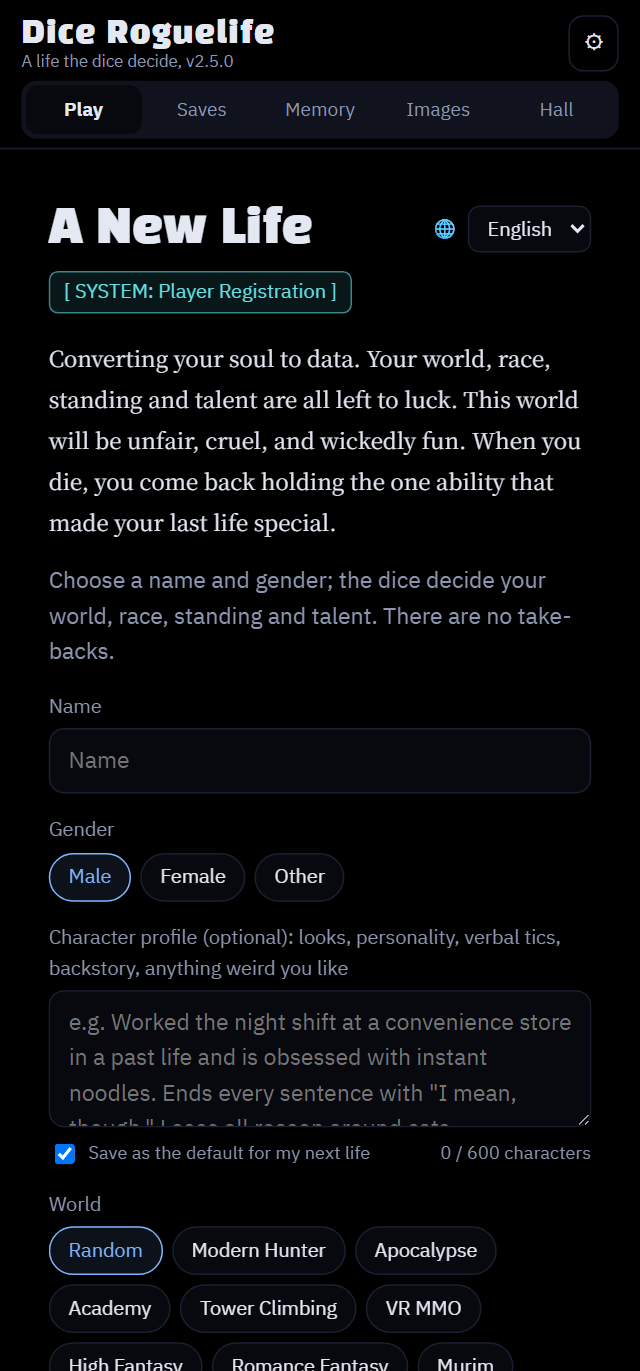
이름과 세계만 고르면 돼요. 나머지는 주사위가 정해 줘요.
Just pick a name and a world. The dice decide the rest.
名前と世界を選ぶだけです。残りはダイスが決めます。
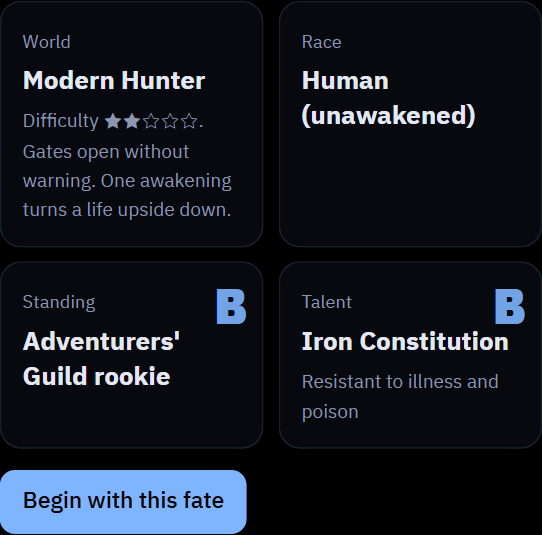
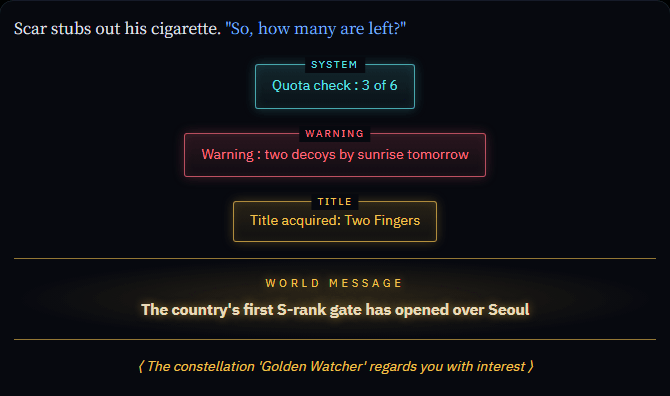
- 죽으면 인생 결산이 나오고, 그 뒤에 다른 세계의 다른 몸으로 회귀해요. 지난 삶의 능력도 하나 물려받아요.
- 이 게임은 claude.ai 아티팩트에서만 돌아가요. 내 아티팩트로 띄우는 방법은 README에 있어요.
- 입력할 때 말과 행동은 그대로 쓰세요. 속마음이나 상황 설명만
*별표*안에 적으면 돼요. 별표 안의 내용은 장면 속 누구도 듣지 못해요. - 화면은 브라우저 언어에 따라 한국어, 영어, 일본어 중 하나로 시작해요. ⚙ 설정 → 화면 언어나 새 게임 화면의 🌐에서 언제든 바꿀 수 있고, 이야기 언어는 저장마다 시작할 때의 언어로 이어져서, 화면 언어를 바꿔도 진행 중인 이야기는 그대로예요. 입력은 아무 언어로 해도 돼요. 서술은 이야기 언어로 나와요.
- When you die, the Life Review sums up your life, then you regress into a different body in a different world, carrying one ability from the life before.
- The game runs only as a claude.ai artifact. How to publish your own copy is in the README.
- Write speech and actions as they are. Put only thoughts or scene notes inside
*asterisks*; no one in the scene hears what's inside them. - The game starts in English, Korean or Japanese depending on your browser. Switch any time in ⚙ Settings → Language or with 🌐 on the new-game screen. Each save keeps the story language it began in, so switching the screen language never changes a story in progress. You can type in any language; the narrator answers in the story language.
- 死ぬと人生の決算で一生が締めくくられ、前世の能力をひとつ持って別の世界の別の体に回帰します。
- ゲームはclaude.ai のアーティファクトでのみ動きます。自分用に公開する方法は README にあります。
- 台詞と行動はそのまま書き、心の声や状況の説明だけを
*アスタリスク*で囲みます。囲んだ中身は場面の誰にも聞こえません。 - ゲームはブラウザの言語に合わせて英語、韓国語、日本語のどれかで始まります。⚙ 設定 → 言語(Language)や新しいゲーム画面の 🌐 でいつでも切り替えられます。物語の言語はセーブごとに始めたときの言語で続くので、画面の言語を変えても進行中の物語は変わりません。入力はどの言語でもよく、語りは物語の言語で返ってきます。
주사위 켜기 / 끄기
Dice on / off
ダイスのオン / オフ
새 삶을 시작할 때 한 번 고르면 돼요. 시작하고 나면 그 저장에서는 바꿀 수 없어요.
You choose once when a new life starts. After that it's fixed for that save.
新しい人生を始めるときに一度だけ選びます。その後はそのセーブでは変えられません。
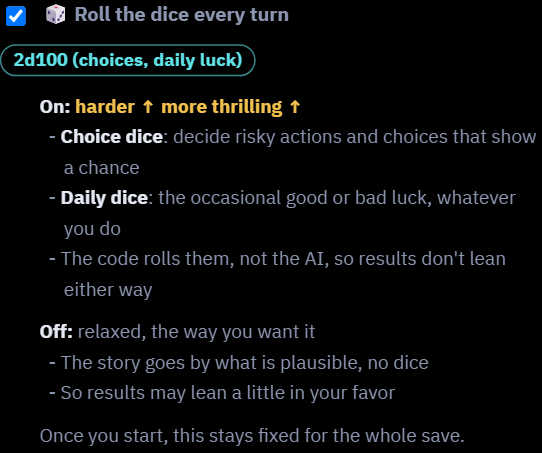
켜면 스릴이 있어요
- 켜면 더 어렵고 스릴 있어요.
- 선택지 주사위는 위험한 행동이나 확률이 붙은 선택지가 성공할지 실패할지 정해요.
- 생활 주사위는 내 행동과 상관없이 가끔 행운이나 불운을 가져와요. 억울한 불운이 올 때도 있어요.
- AI가 아니라 코드가 굴려서 결과가 한쪽으로 쏠리지 않아요.
- d100을 굴리고, 숫자가 낮을수록 좋아요. 성공 확률이 60%면 60 이하가 나와야 성공이에요.
On: more thrills
- Harder and more thrilling.
- Choice dice decide whether risky actions, and choices that show a chance, succeed or fail.
- Daily dice bring the occasional good or bad luck, whatever you do. Sometimes the bad luck feels unfair.
- The code rolls them, not the AI, so results don't lean either way.
- It's a d100 and lower is better: at a 60% chance, you need 60 or under.
オン:スリルがある
- 難しく、スリルがあります。
- 選択肢のダイスが、危険な行動や確率付きの選択肢の成否を決めます。
- 日々のダイスが、何をしていても時々幸運や不運を運んできます。不運が理不尽に感じることもあります。
- 振るのはAIではなくコードなので、結果がどちらかに偏りません。
- d100で低いほど良いです。成功率60%なら60以下で成功です。
끄면 자유로워요
- 주사위 없이 개연성에 따라 이야기가 흘러가요.
- 내가 원하는 전개를 대체로 따라가고, 일부러 불리하게 꼬지 않아요.
- 선택지에 확률이 붙지 않아요. 선택지는 참고용 제안일 뿐이에요.
- 내가 쓴 대로 이야기가 흘러가는 롤플레이를 원하면 이쪽이 잘 맞아요.
- 다만 없는 아이템이나 힘이 있다고 선언하면 허풍으로 처리돼요. 켜든 끄든 똑같아요.
Off: more freedom
- No dice; the story goes by what's plausible.
- It mostly follows where you want the story to go and doesn't twist things against you on purpose.
- Choices show no odds; they're only suggestions.
- The better fit if you want roleplay where the story follows what you write.
- Still, declaring an item or power you don't have is treated as a bluff, dice on or off.
オフ:自由に遊べる
- ダイスなしで、ありそうかどうかで物語が進みます。
- おおむね望む方向に物語が進み、わざと不利にひねったりしません。
- 選択肢に確率は付かず、あくまで提案です。
- 書いたとおりに物語が進むロールプレイをしたい人に向いています。
- ただし、持っていないアイテムや力を宣言するのは、ダイスのオン・オフに関係なくハッタリとして扱われます。
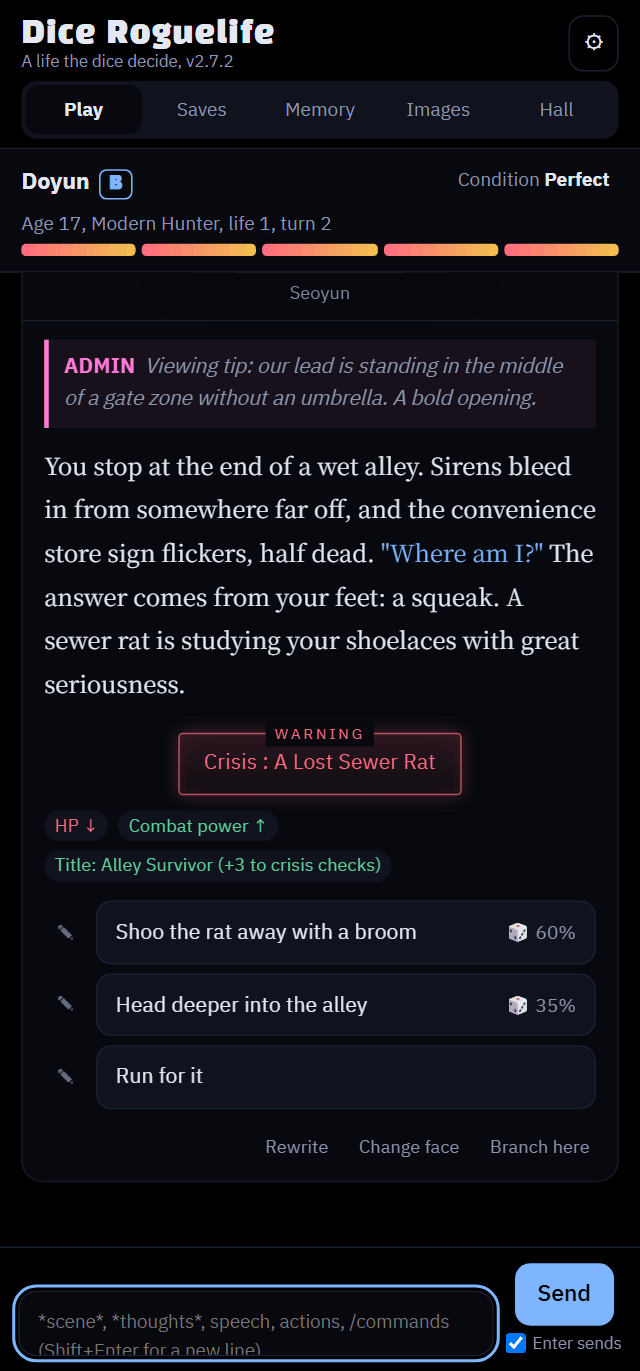
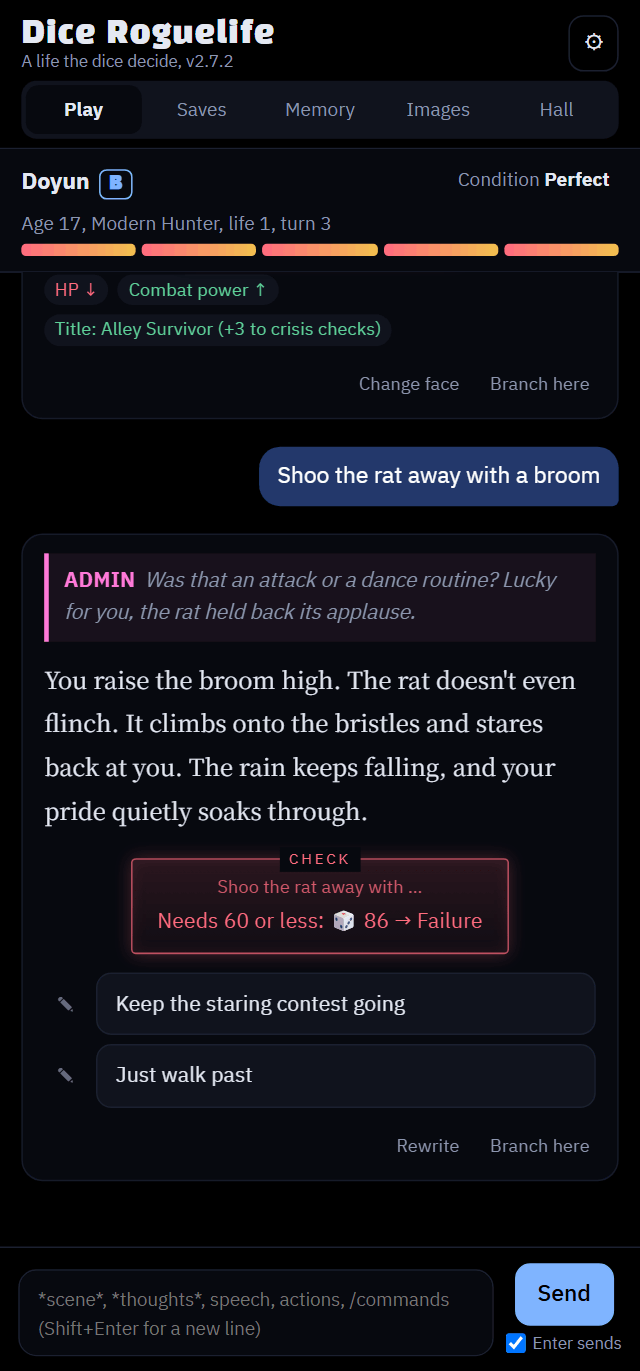
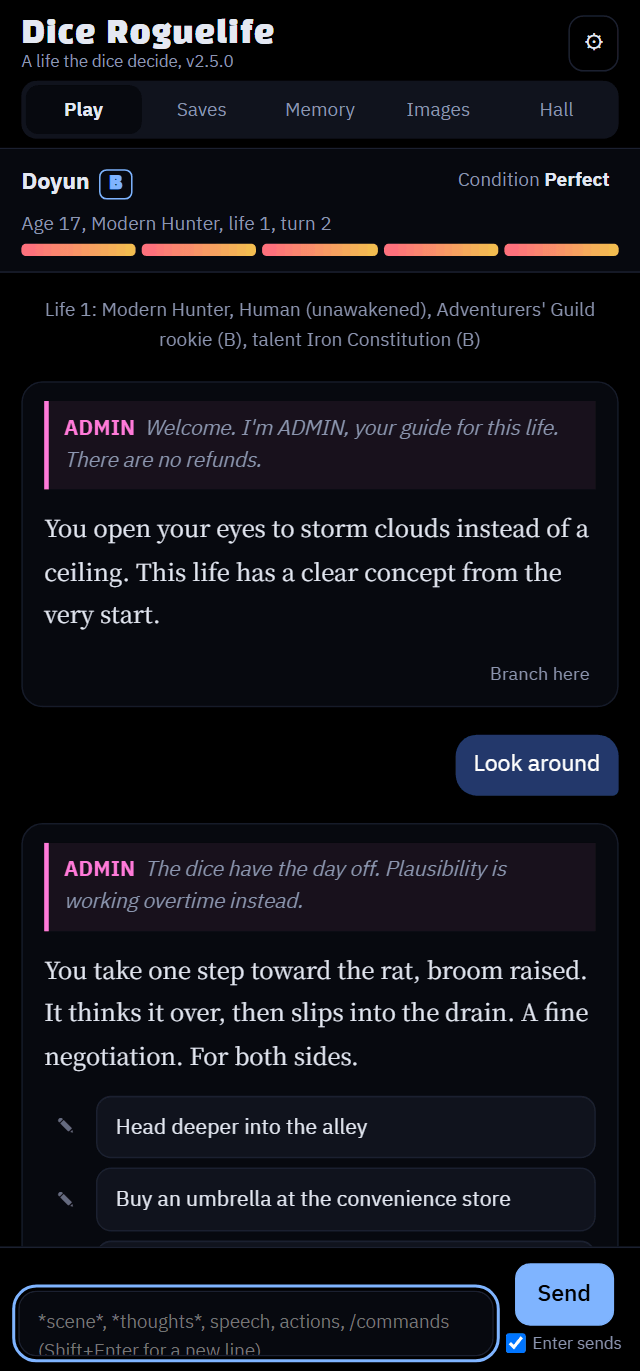
/판정으로 방금 판정의 이유 묻기
Ask why a check went that way with /why
/why で判定の理由を聞く
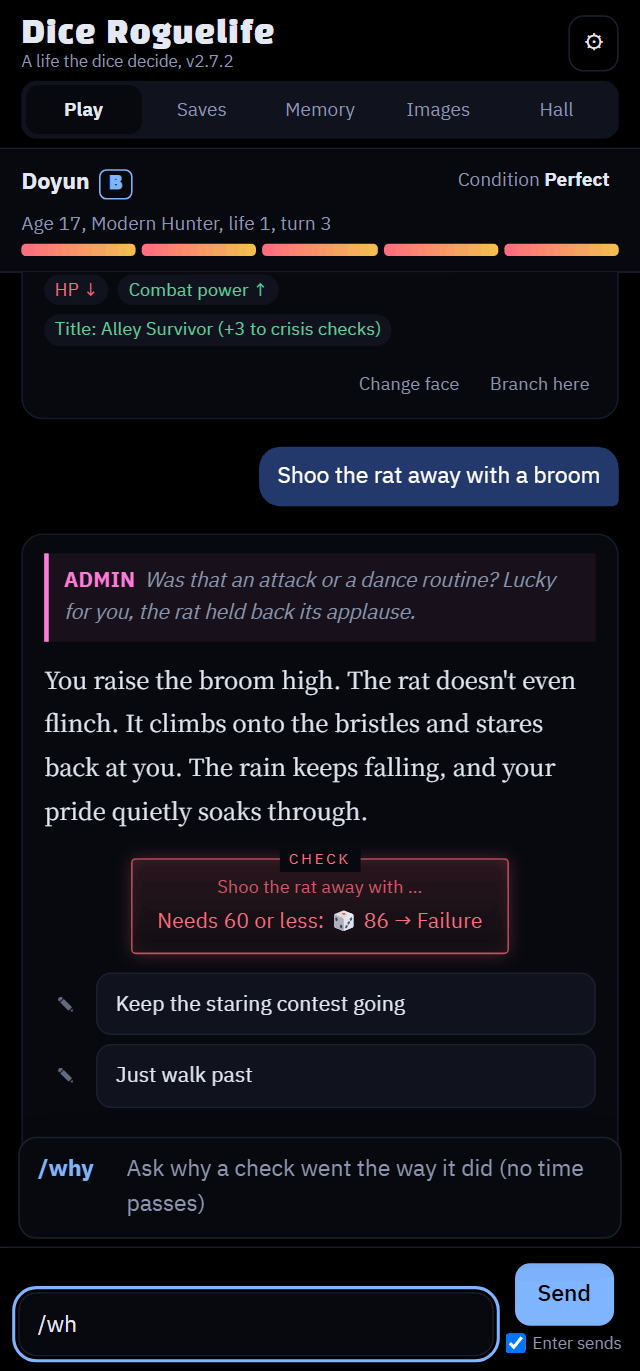
/판을 치면 /판정이 떠요./wh and /why pops up./wh と打つと /why が出てきます。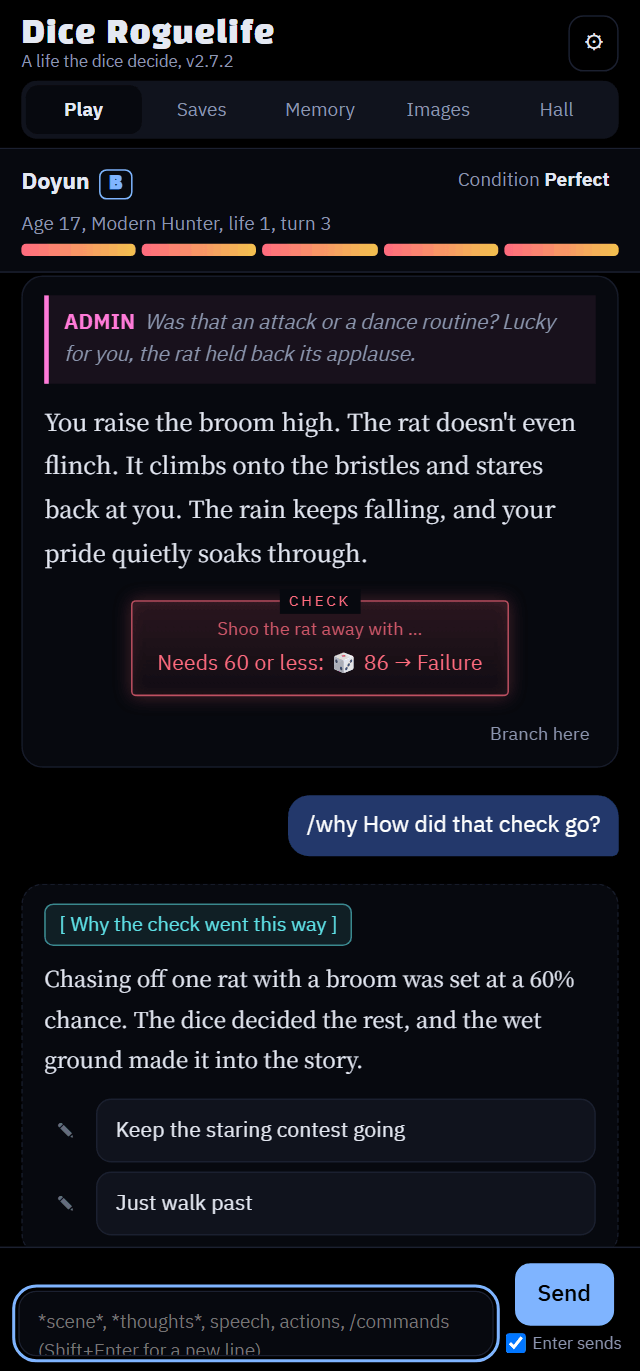
/판정은 주사위를 새로 굴리는 명령이 아니에요. 방금 판정이 왜 그렇게 나왔는지 물어보는 명령이고, 게임 속 시간은 흐르지 않아요.- 이유가 규칙이나 기록과 맞지 않으면 AI가 실수를 인정하고 바로잡을 수 있어요.
- 판정이 이상하게 서술됐다면 먼저 이 명령으로 물어보세요. 주사위 결과 자체는 코드가 정한 값이에요.
/whydoes not reroll anything. It asks why the last check came out the way it did, and no time passes in the game.- If the reasoning doesn't match the rules or the record, the AI can admit the mistake and fix it.
- If a check was narrated strangely, ask with this first. The dice result itself is set by the code.
/whyは何も振り直しません。直前の判定がなぜそうなったかを聞くだけで、ゲーム内の時間も進みません。- 理由がルールや記録と合わなければ、AIが誤りを認めて直すこともあります。
- 判定の語られ方がおかしいと思ったら、まずこれで聞いてください。ダイスの結果そのものはコードが決めています。
내 설정으로 시작 (자유 설정)
Start with your own setup (Custom)
自分の設定で始める(自由設定)
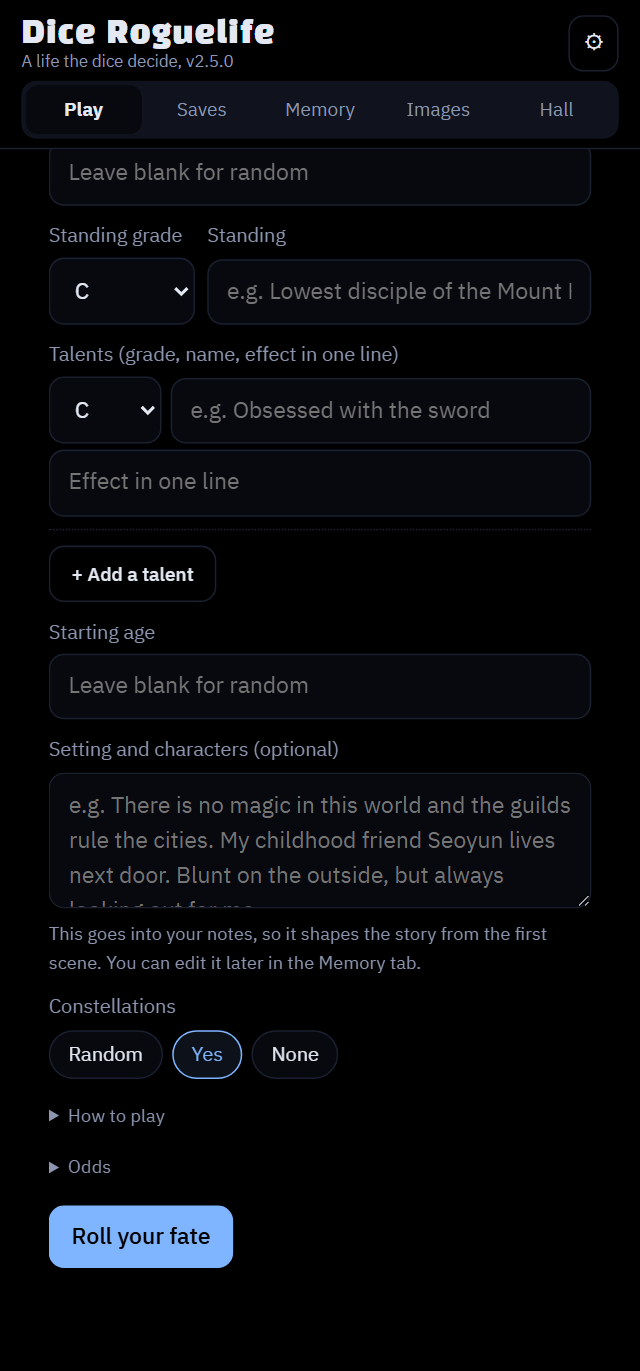
주사위 대신 종족, 신분, 재능, 주변 인물을 직접 정할 수 있어요.
Instead of the dice, choose your race, standing, talents and the people around you.
ダイスの代わりに、種族、身分、才能、周りの人物を自分で決められます。
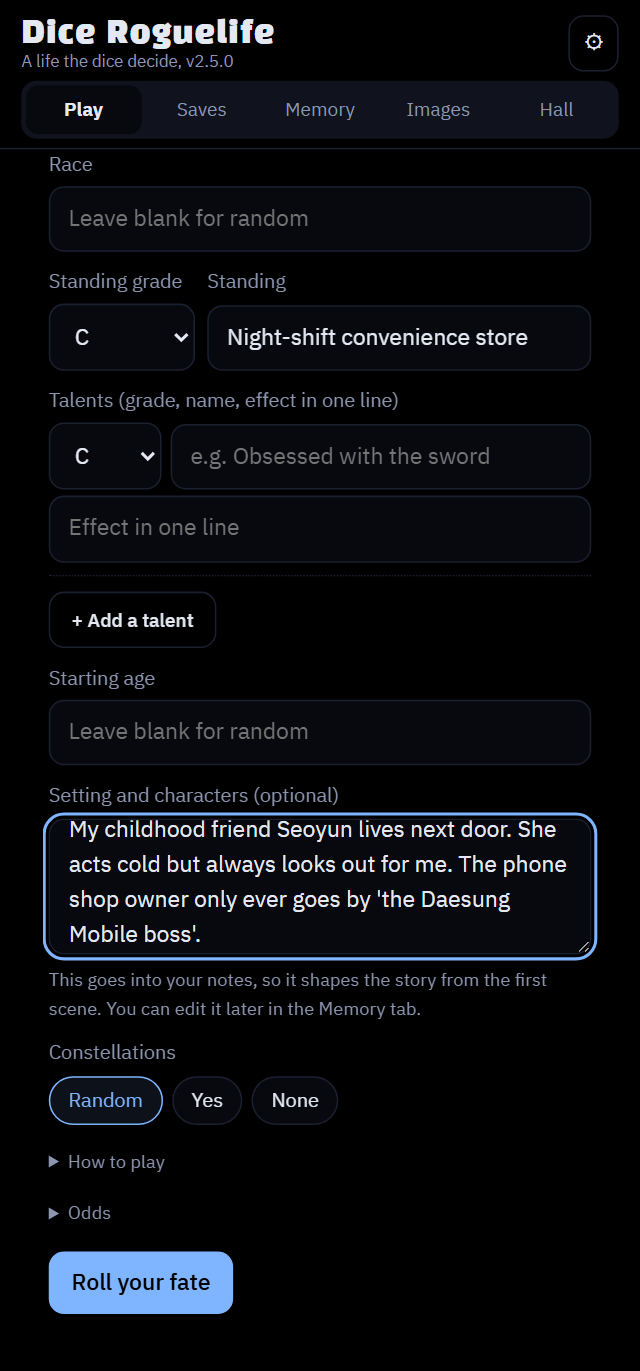
- 이름은 내 캐릭터의 이름이에요. 성별은 남, 여, 기타 중에서 골라요.
- 세계관, 등장인물 칸에는 인물 이름과 역할을 문장으로 적어요. 예: "소꿉친구 한서윤이 옆집에 산다. 겉으론 퉁명스럽지만 늘 나를 챙긴다."
- 적은 내용은 유저 노트에 들어가서 첫 장면부터 반영돼요. 나중에 기억 탭에서 고칠 수도 있어요.
- 플레이어 설정에는 외형, 성격, 말버릇, 배경 이야기를 적어요. "다음 삶의 기본값으로 저장"도 할 수 있어요.
- 성좌는 무작위, 있음, 없음 중에서 골라요. 자세한 내용은 아래 성좌 항목을 보세요.
- Name is your character's name. Gender is Male, Female or Other.
- In Setting and characters, describe people and their roles in sentences. Example: "My childhood friend Seoyun lives next door. Blunt on the outside, but always looking out for me."
- What you write goes into your notes and shapes the story from the first scene. You can edit it later in the Memory tab.
- In Character profile, write looks, personality, verbal tics and backstory. You can also tick "Save as the default for my next life".
- Constellations: choose Random, Yes or None. See the Constellations section below.
- 名前はキャラクターの名前です。性別は男性、女性、その他から選びます。
- 世界観と登場人物には、人物と役割を文章で書きます。例:「幼なじみのソユンが隣に住んでいる。外ではぶっきらぼうだけど、いつも私を気にかけてくれる。」
- 書いた内容はメモに入り、最初の場面から物語に反映されます。あとで記憶タブで直せます。
- キャラクター設定には外見、性格、口癖、背景を書きます。「次の人生のデフォルトとして保存」にチェックもできます。
- 星座:ランダム、あり、なしから選びます。下の「星座」の節を参照してください。
상태창과 칭호
Status window and titles
ステータスウィンドウと称号
위쪽 상태 바를 누르거나 /상태를 입력하면 열려요.
Tap the status bar at the top, or type /status.
上のステータスバーをタップするか、/status と入力すると開きます。
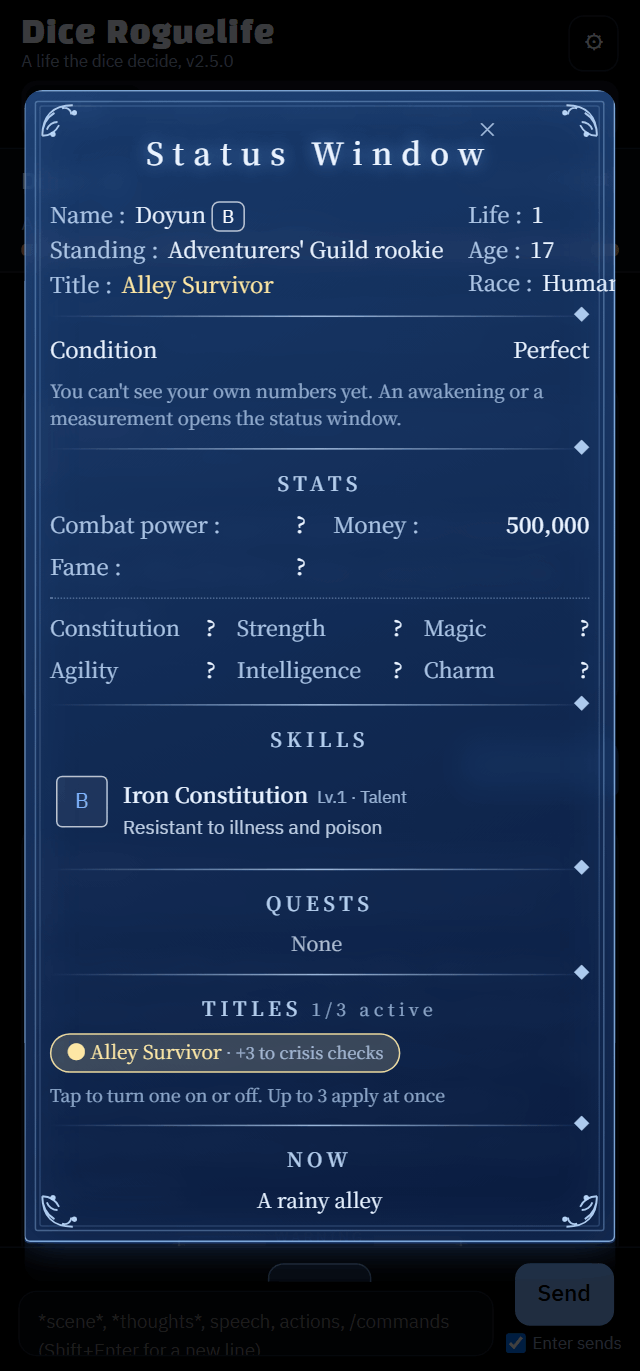
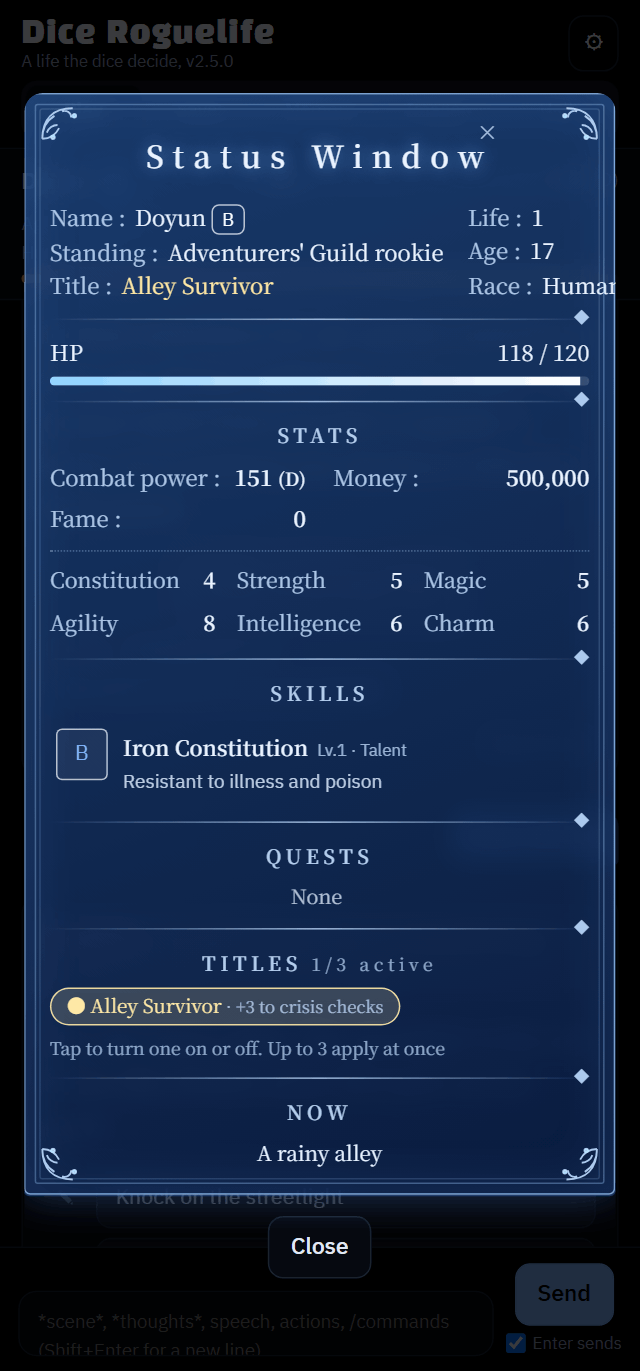
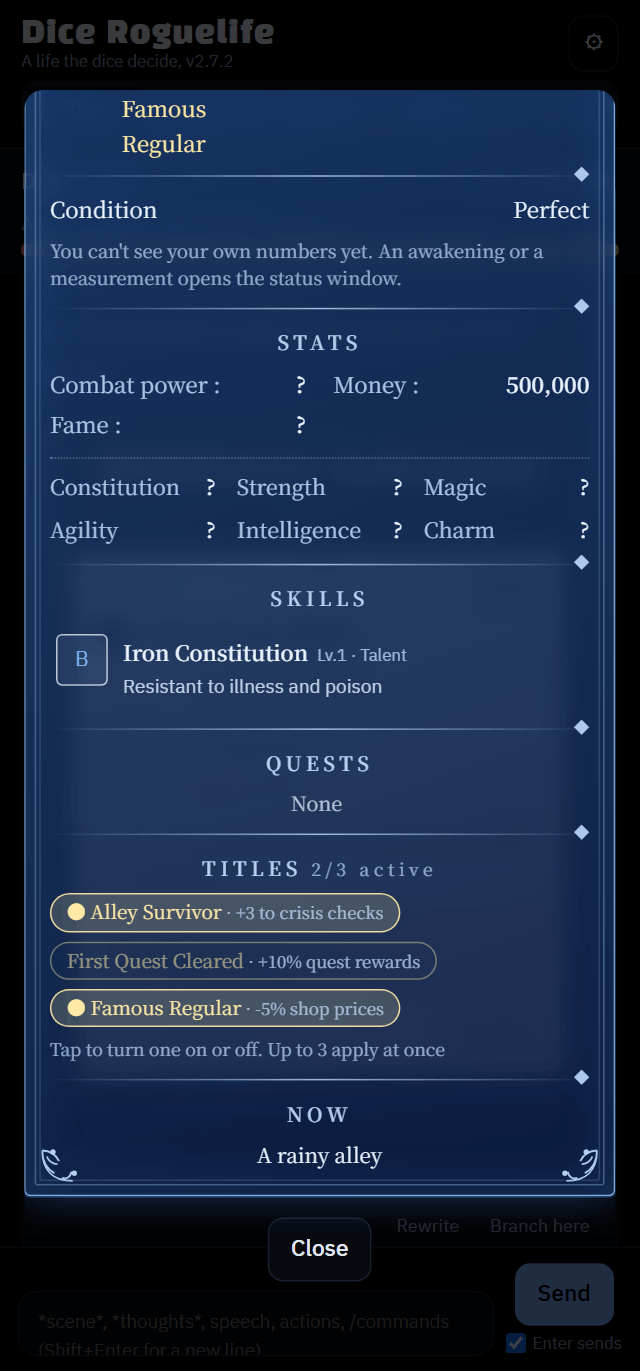
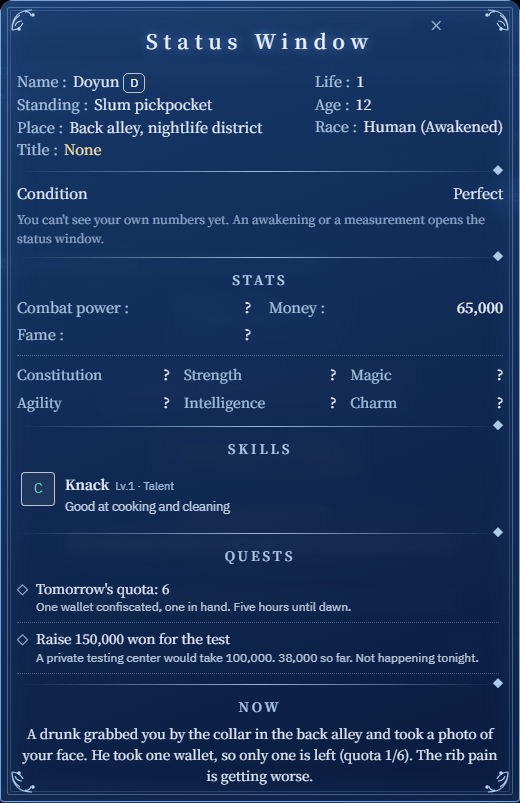
- 기본값인 자동은 헌터물, VR MMO, 탑, 아카데미처럼 시스템이 있는 세계에서만 각성 전에 숫자를 숨겨요. 다른 세계에서는 처음부터 보여요.
- ⚙ 설정 → 상태창 공개에서 자동, 항상 공개, 모든 세계에서 각성 후 공개, 숨김 중에 고를 수 있어요. 숨김은 각성해도 숫자 없이 이야기로만 알려 줘요.
- 칭호를 얻을 때 자리가 남아 있으면 저절로 켜져요. 효과는 칭호 옆에 나와요.
- The default, Auto, hides numbers before awakening only in worlds with a system (Hunter, VR MMO, Tower, Academy). Other worlds show them from the start.
- ⚙ Settings → Status window numbers: Auto, Always, After awakening in every world, or Hidden. Hidden never shows numbers, even after awakening; you learn through the story.
- A new title turns on by itself if there's a free slot. Its effect shows next to it.
- 初期設定の自動では、システムのある世界(ハンター、VR MMO、塔、アカデミー)でだけ覚醒前の数値を隠します。ほかの世界では最初から表示されます。
- ⚙ 設定 → ステータスウィンドウの数値:自動、常に表示、すべての世界で覚醒後、非表示。非表示では覚醒しても数値は出ず、物語でだけわかります。
- 新しい称号は、空きがあれば自動でオンになります。効果は横に表示されます。
성좌 (후원자) 옵션
Constellations (sponsors)
星座(スポンサー)
나를 지켜보는 존재가 있는 삶인지 정해요. 자유 설정에서 직접 고를 수 있어요.
Decide whether something is watching over your life. You can choose it in the Custom setup.
自分の人生を見守る存在がいるかどうかを決めます。自由設定で選べます。
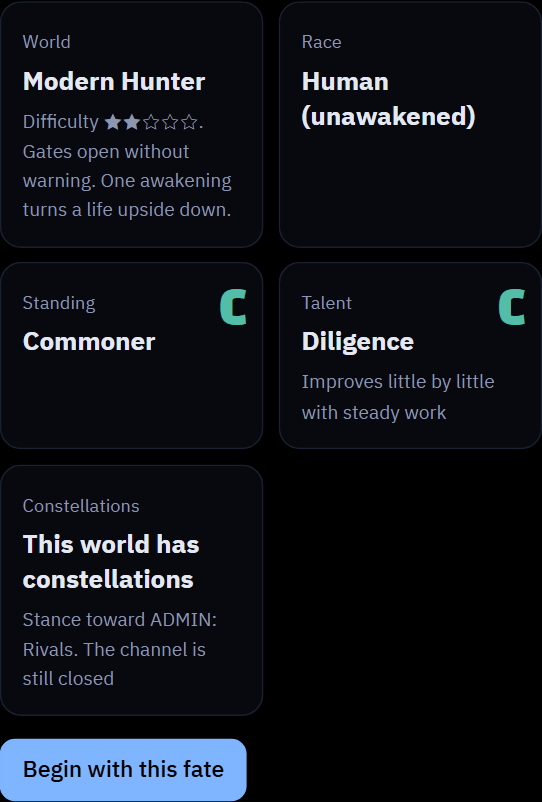
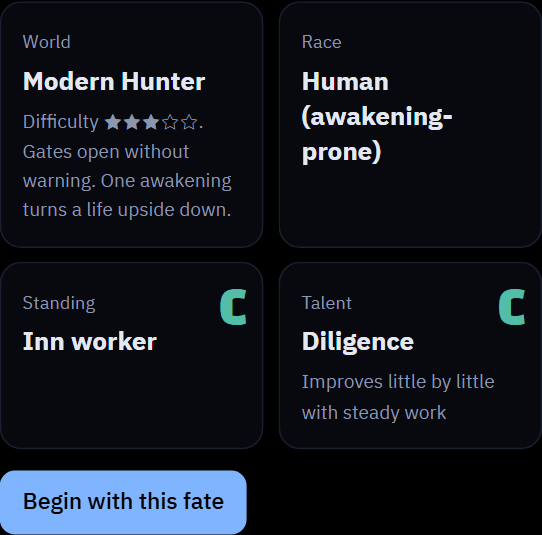
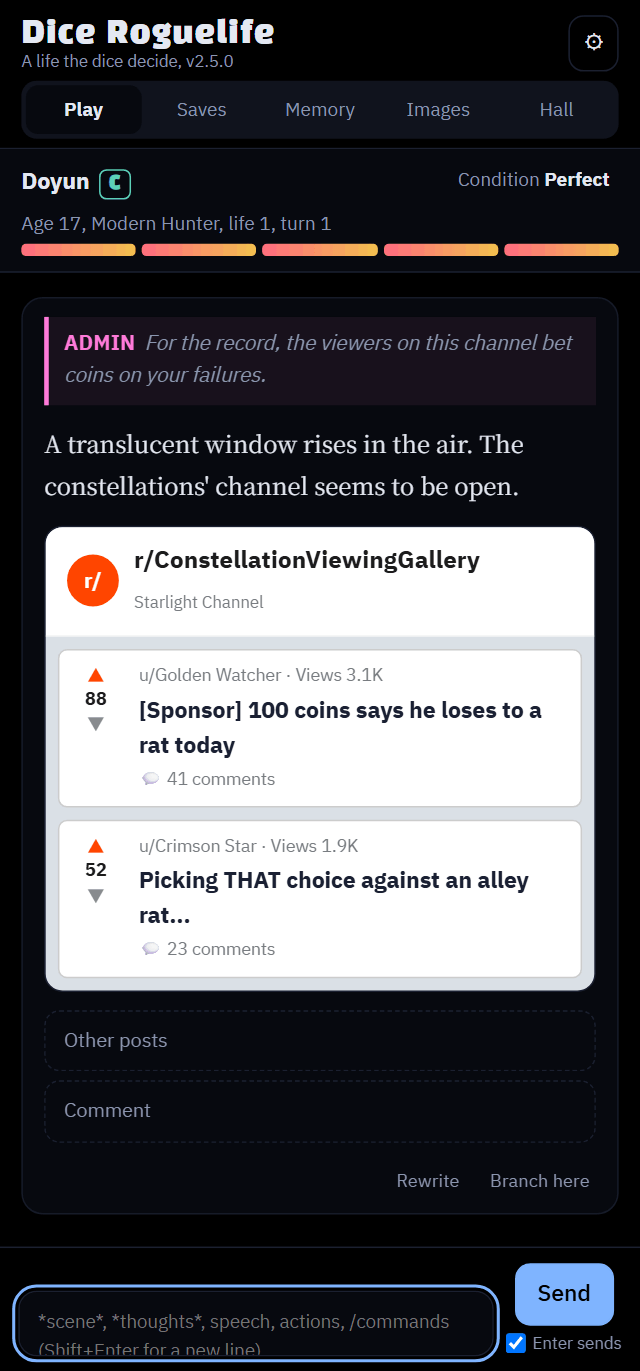
/성좌로 관전 갤러리를 볼 수 있어요./star shows their viewing gallery./star で観戦ギャラリーを見られます。- 성좌가 있는 삶은 채널이 처음엔 닫혀 있어요. 각성하거나 큰 사건이 생기면 열려요.
- 열리기 전에
/성좌를 치면 "아직 당신을 보지 않아요"라고 나와요. 성좌가 없는 삶이면 "이 세계에는 성좌가 없어요"라고 나와요. - 주사위로 시작하면 세계마다 정해진 확률로 성좌가 있을지 정해져요. 헌터물과 탑은 성좌가 흔한 편이에요.
- ADMIN의 말투는 ⚙ 설정의 ADMIN 페르소나에서 바꿀 수 있어요.
- In a life with constellations, the channel starts closed. It opens after an awakening or a big event.
- Typing
/starbefore it opens tells you they aren't watching yet. In a life without constellations, it tells you this world has none. - With the dice, each world has its own chance of having constellations. They're common in Hunter and Tower worlds.
- Change ADMIN's personality in ⚙ Settings → ADMIN persona.
- 星座のいる人生では、チャンネルは閉じた状態で始まります。覚醒や大きな出来事のあとに開きます。
- 開く前に
/starと打つと、まだ見ていないと教えてくれます。星座のいない人生では、この世界には星座がいないと教えてくれます。 - ダイスで始める場合、星座のいる確率は世界ごとに違います。ハンターや塔の世界でよく出ます。
- ADMINの性格は ⚙ 設定 → ADMINのペルソナで変えられます。
명령어, 게시판, 메신저
Commands, boards and messenger
コマンド、掲示板、メッセンジャー
입력창에 /를 치면 목록이 떠요. 이야기 속 화면을 불러오는 명령어예요.
Type / in the input box for the list. Commands bring up screens inside the story.
入力欄に / と打つと一覧が出ます。物語の中の画面を呼び出すコマンドです。
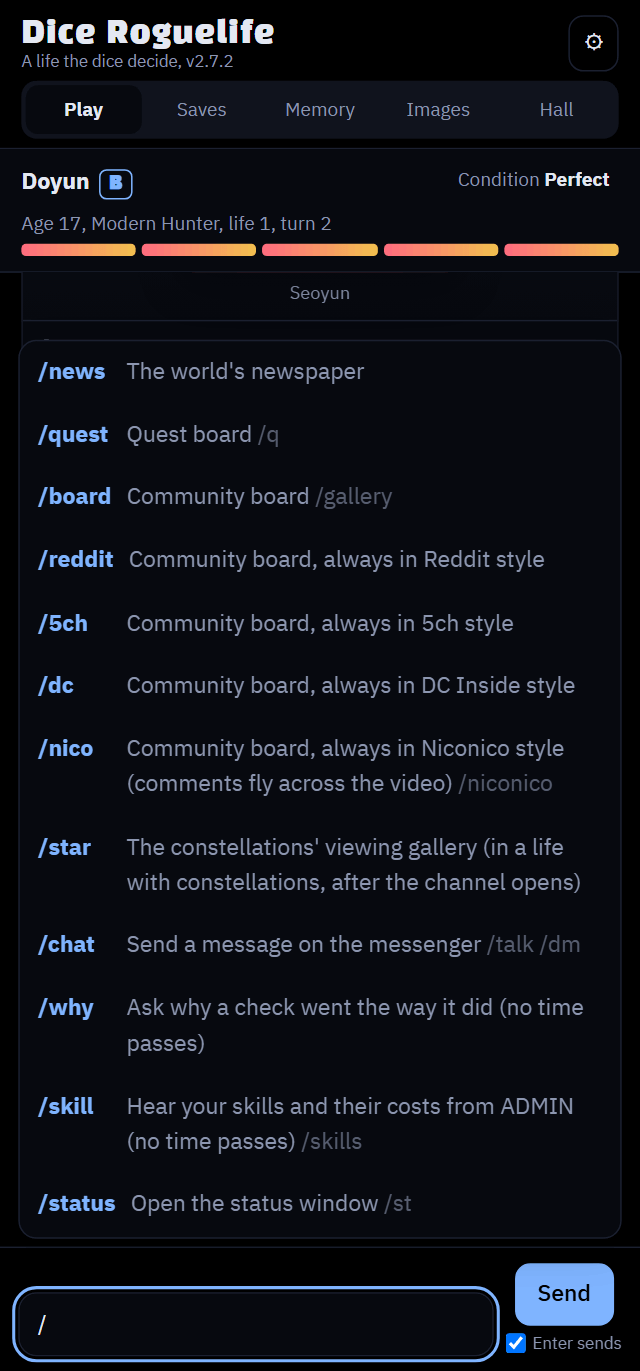
/ 한 글자만 치면 전체 목록이 떠요. 눌러서 고르면 돼요./ to see them all. Tap one to pick it./ を1文字打つだけで全部表示されます。タップして選んでください。| 명령 | 별칭 | 하는 일 |
|---|---|---|
/뉴스 | /news | 세계의 소식지를 봐요 |
/의뢰 | /quest /q | 의뢰 게시판을 봐요 |
/갤 | /board /gallery | 커뮤니티 게시판을 봐요 (DC, 레딧, 5ch, 니코니코 스타일) |
/레딧 | /reddit | 커뮤니티 게시판을 항상 레딧 스타일로 봐요 |
/5ch | 커뮤니티 게시판을 항상 5ch 스타일로 봐요 | |
/디시 | /dc | 커뮤니티 게시판을 항상 디시 스타일로 봐요 |
/니코 | /nico /niconico /니코니코 | 커뮤니티 게시판을 항상 니코니코 스타일로 봐요 (댓글이 영상 위로 흘러요) |
/성좌 | /star /성좌갤 | 성좌들의 관전 갤러리를 봐요 (성좌가 있는 삶에서, 채널이 열린 뒤) |
/톡 | /chat /talk /dm | 메신저로 메시지를 보내요 (카톡, 왓츠앱, 라인 스타일) |
/판정 | /why /근거 | 판정 근거를 물어봐요 (게임 속 시간은 안 흘러요) |
/스킬 | /skill /skills /기술 | ADMIN에게 스킬 목록과 비용을 들어요 (게임 속 시간은 안 흘러요) |
/상태 | /status /st | 상태창을 열어요 |
| Command | Also | What it does |
|---|---|---|
/news | The world's newspaper | |
/quest | /q | The quest board |
/board | /gallery | The community board (Reddit, 5ch, Niconico or DC Inside style) |
/reddit | The community board, always in Reddit style | |
/5ch | The community board, always in 5ch style | |
/dc | The community board, always in DC Inside style | |
/nico | /niconico | The community board, always in Niconico style (comments fly across the video) |
/star | The constellations' viewing gallery (in a life with constellations, after the channel opens) | |
/chat | /talk /dm | Send a message on the messenger (WhatsApp, LINE or KakaoTalk style) |
/why | Ask why a check went the way it did (no game time passes) | |
/skill | /skills | Hear your skills and their costs from ADMIN (no game time passes) |
/status | /st | Open the status window |
| コマンド | 別名 | 内容 |
|---|---|---|
/news | 世界のニュース | |
/quest | /q | 依頼掲示板 |
/board | /gallery | コミュニティ掲示板(5ch、ニコニコ、Reddit、DCインサイド風) |
/reddit | コミュニティ掲示板(常にReddit風) | |
/5ch | コミュニティ掲示板(常に5ch風) | |
/dc | コミュニティ掲示板(常にDCインサイド風) | |
/nico | /niconico | コミュニティ掲示板(常にニコニコ風、コメントが動画の上を流れる) |
/star | 星座たちの観戦ギャラリー(星座のいる人生で、チャンネルが開いたあと) | |
/chat | /talk /dm | メッセンジャーでメッセージを送る(LINE、WhatsApp、カカオトーク風) |
/why | 判定の理由を聞く(ゲーム内の時間は進みません) | |
/skill | /skills | ADMINからスキル一覧とコストを聞く(ゲーム内の時間は進みません) |
/status | /st | ステータスウィンドウを開く |
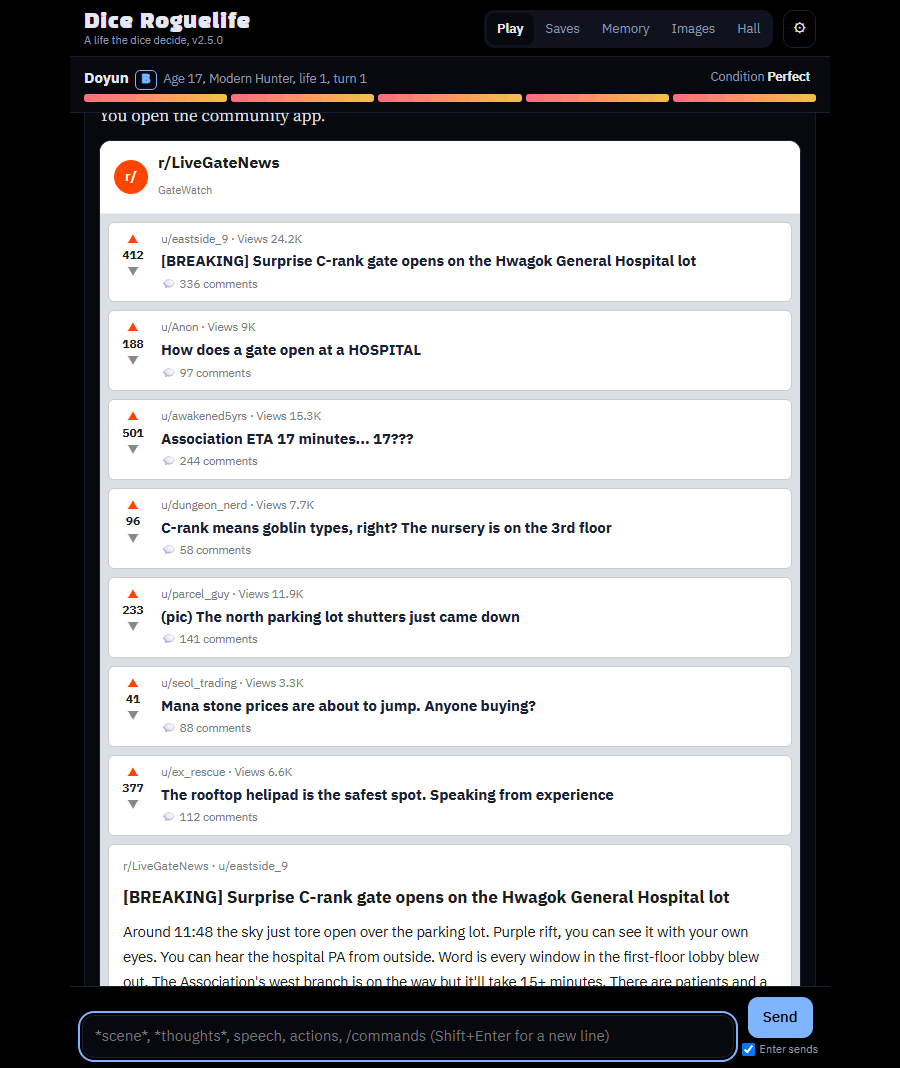
커뮤니티 게시판 /갤
Community board /board
コミュニティ掲示板 /board
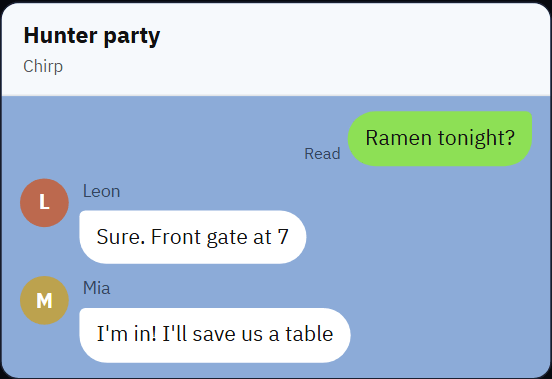
메신저 /톡 (카카오톡 느낌)
Messenger /chat
メッセンジャー /chat
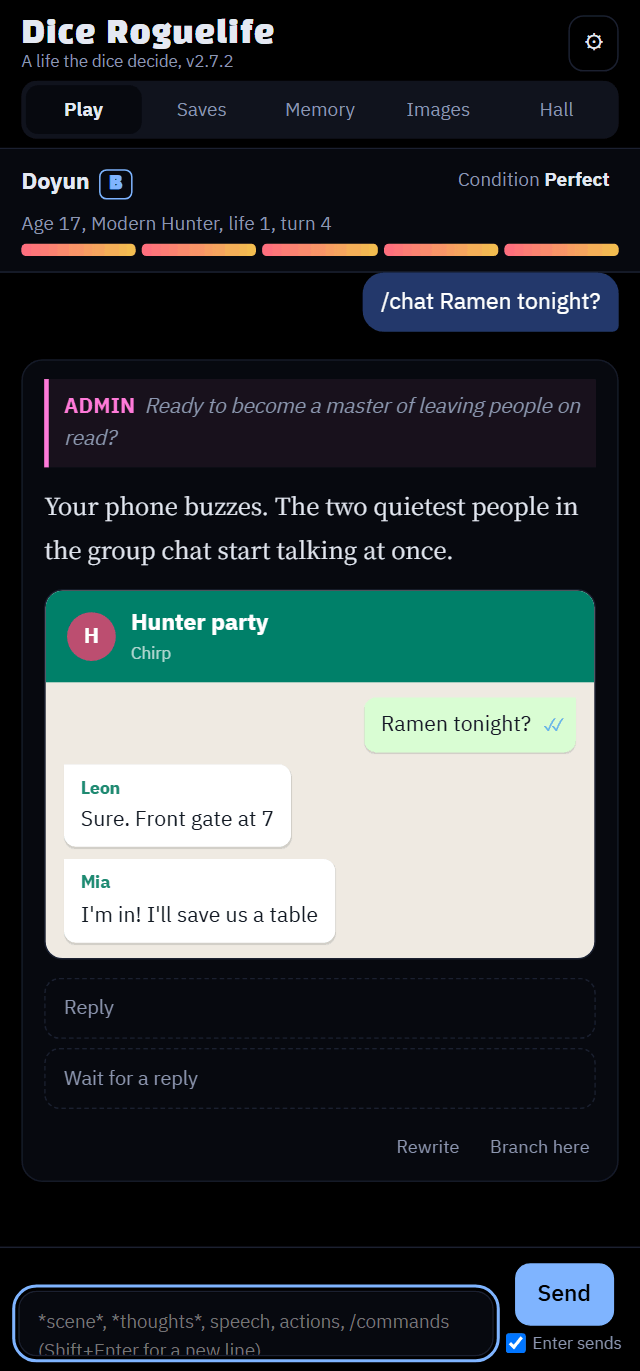
/톡 할 말로 보내면 상대가 답해 주고, 답장하기로 대화를 이어 갈 수 있어요./chat your message and they answer; Reply keeps the conversation going./chat 送る言葉 で送ると相手が返事をし、返信するで会話を続けられます。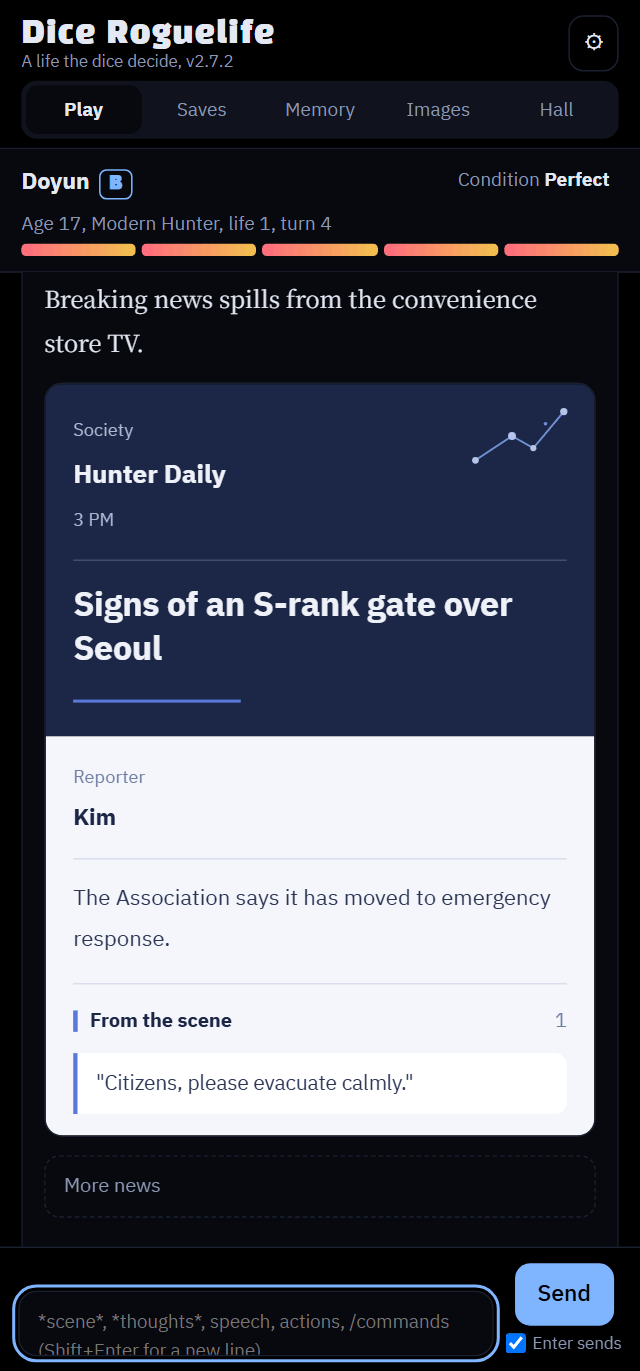
/뉴스/news/news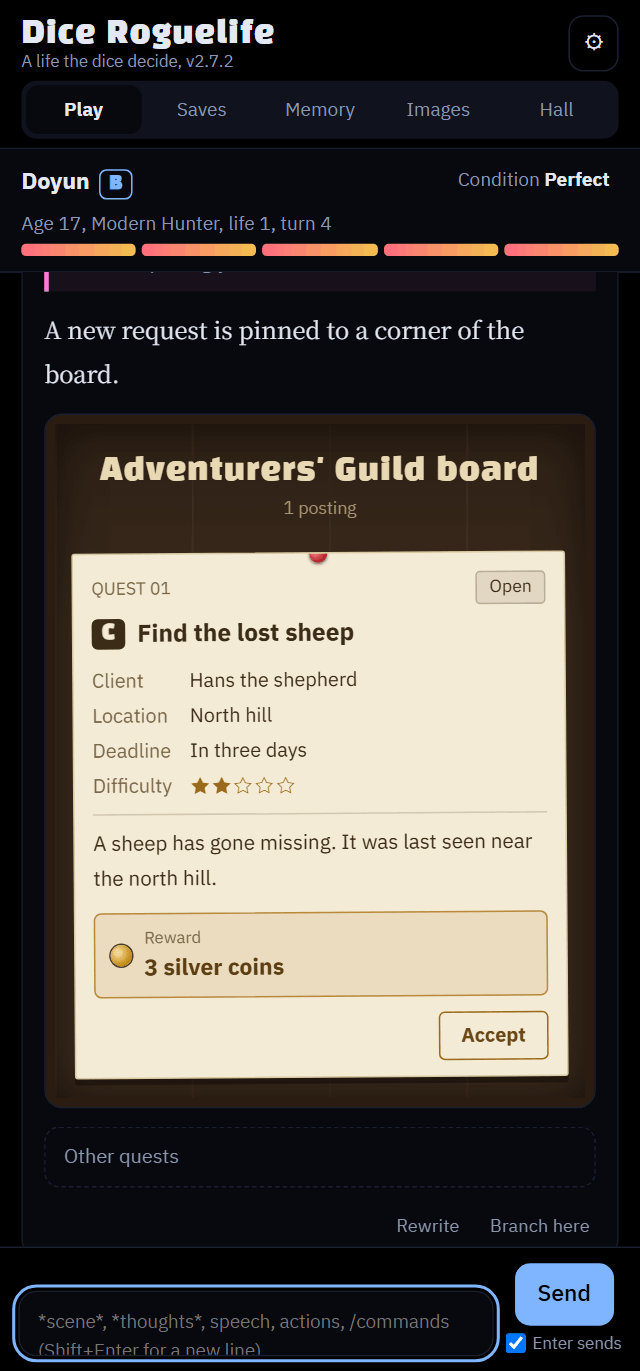
/의뢰/quest/quest카카오톡, 왓츠앱, 라인, 레딧, 5ch, 니코니코와 관련 없는 비공식 프로젝트예요. 위젯은 생김새만 비슷하게 만들었어요.
An unofficial project with no ties to KakaoTalk, WhatsApp, LINE, Reddit, 5ch or Niconico; the widgets only borrow their look.
カカオトーク、WhatsApp、LINE、Reddit、5ch、ニコニコとは関係のない非公式プロジェクトです。ウィジェットは見た目を似せているだけです。
설정 (⚙)
Settings (⚙)
設定(⚙)
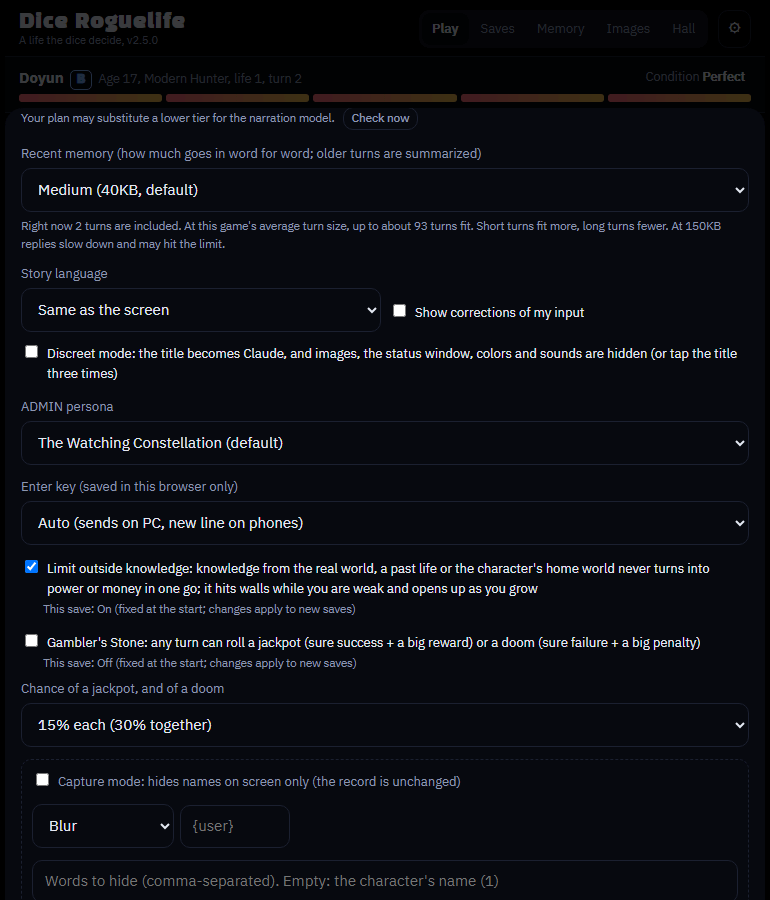
화면 오른쪽 위의 톱니바퀴를 누르면 열려요. 맨 위에 현재 버전과 업데이트 확인 버튼이 있고, 눈에 보이는 옵션은 아래처럼 바뀌어요.
Tap the gear at the top right. The current version and a Check for updates button are at the top; the options change things as shown below.
右上の歯車をタップすると開きます。いちばん上に現在のバージョンと「アップデートを確認」ボタンがあり、各オプションは下のように画面を変えます。
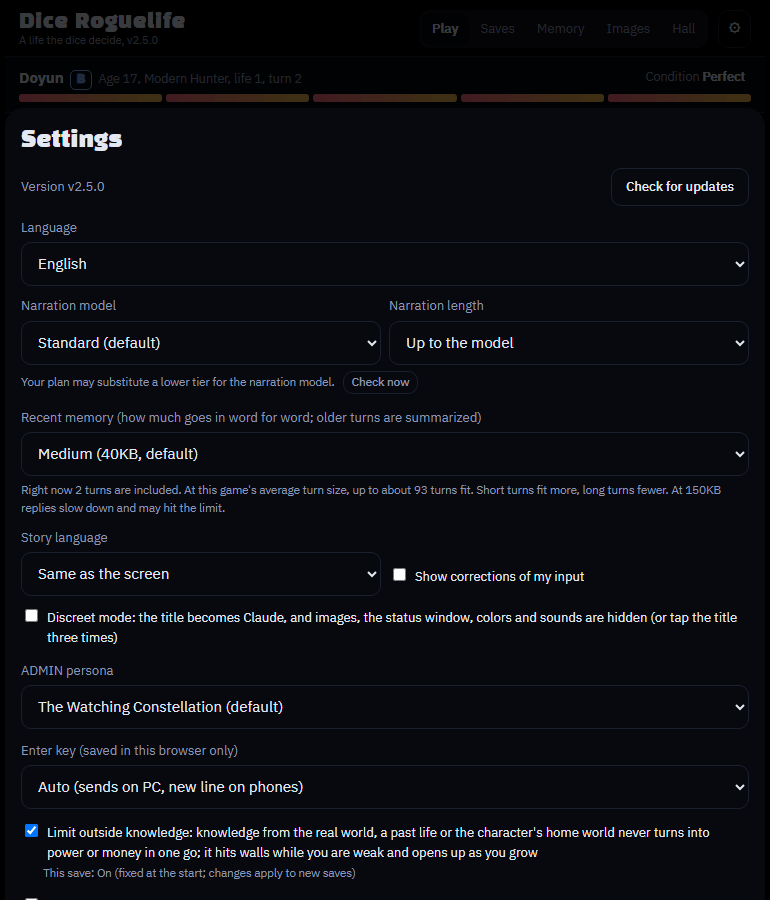
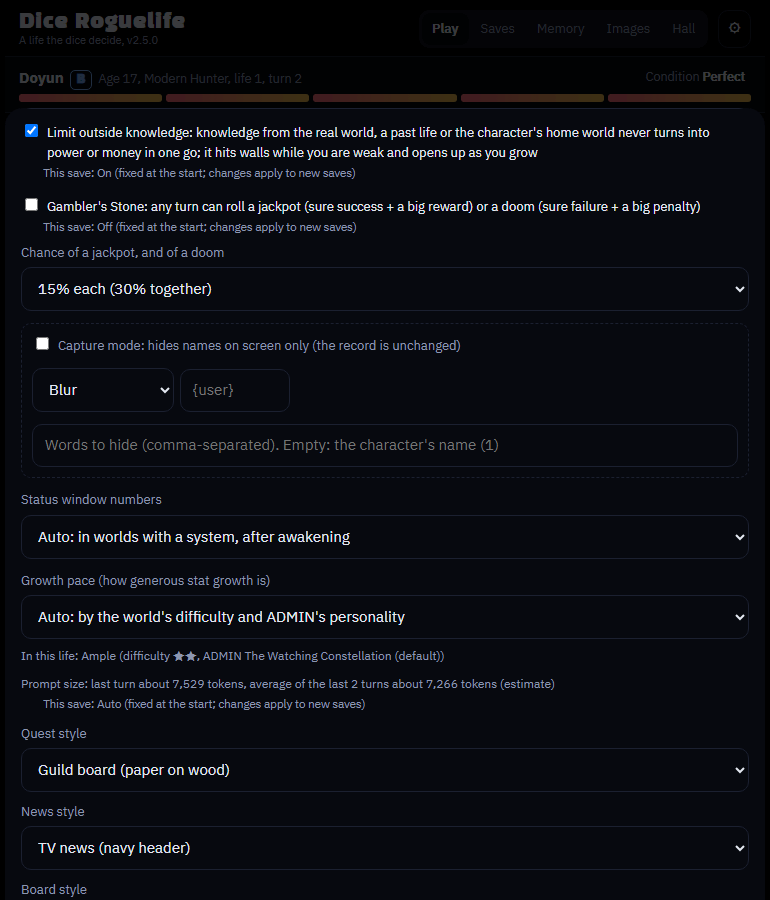
바꾸면 이렇게 보여요
What the options change
オプションで変わるもの
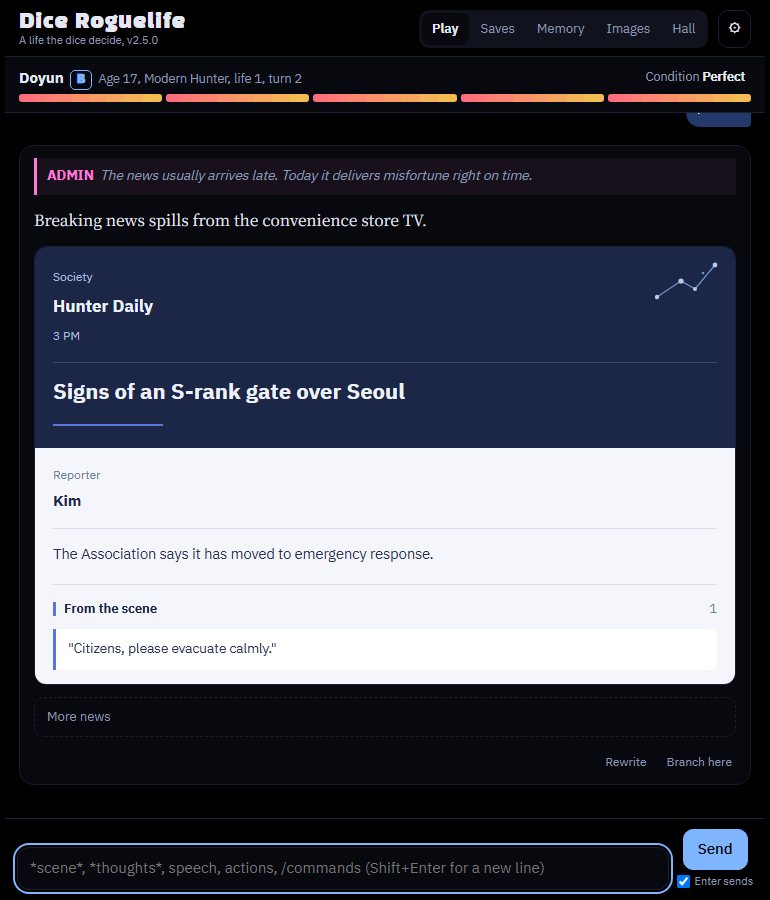
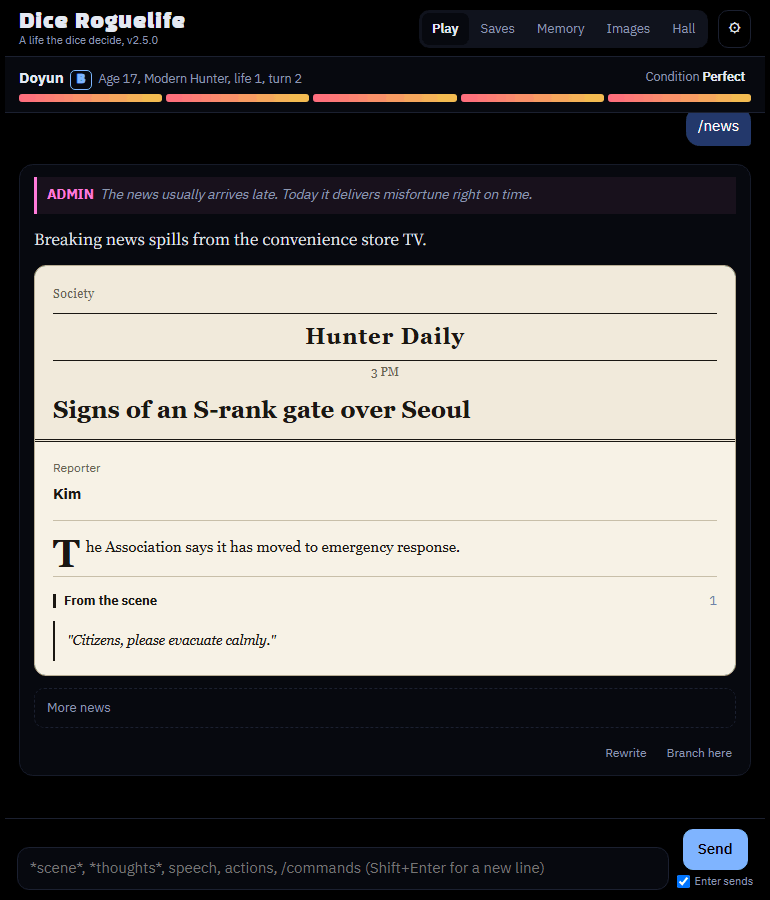
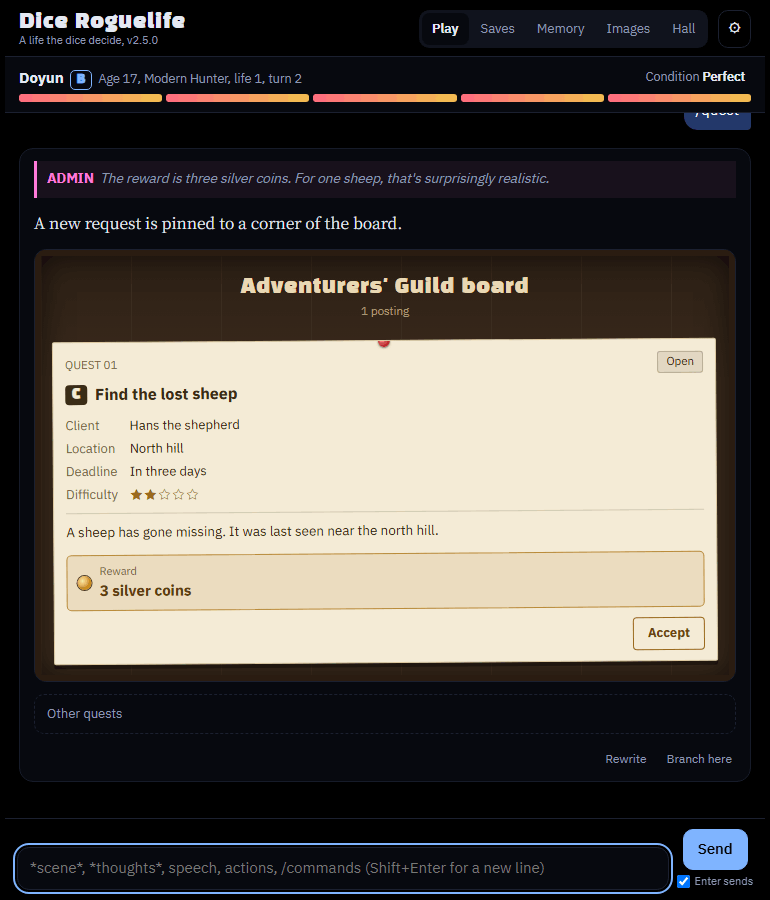
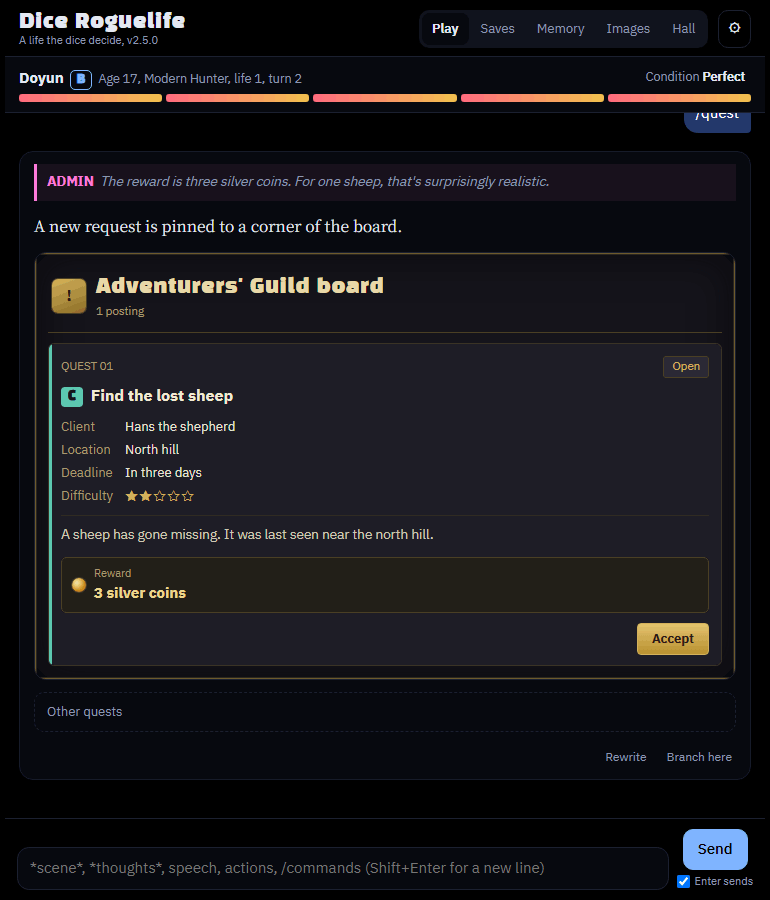
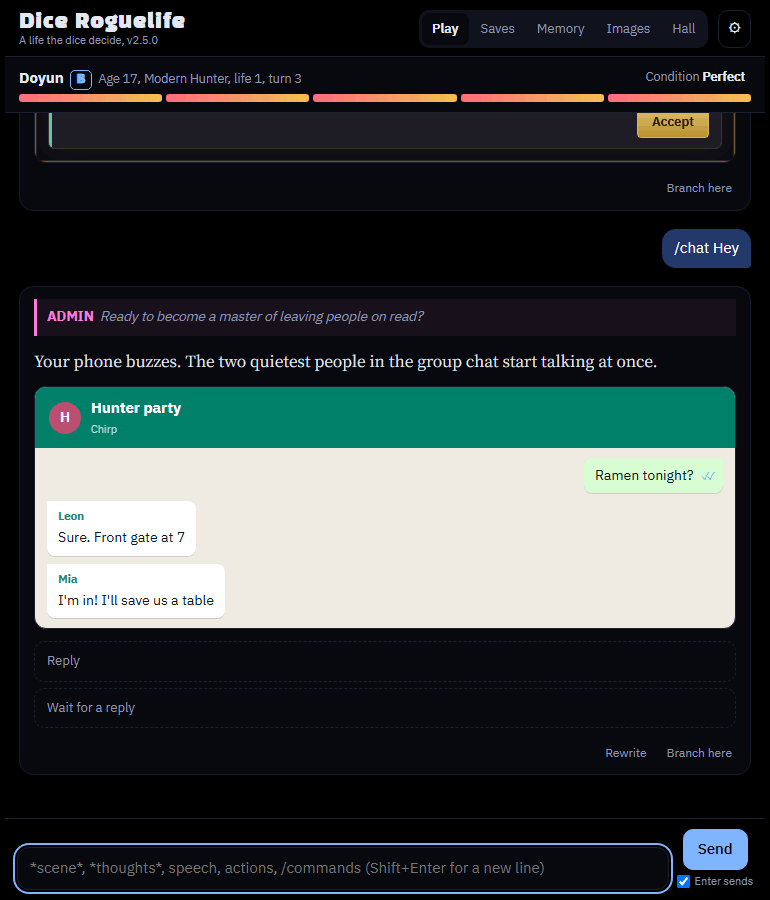
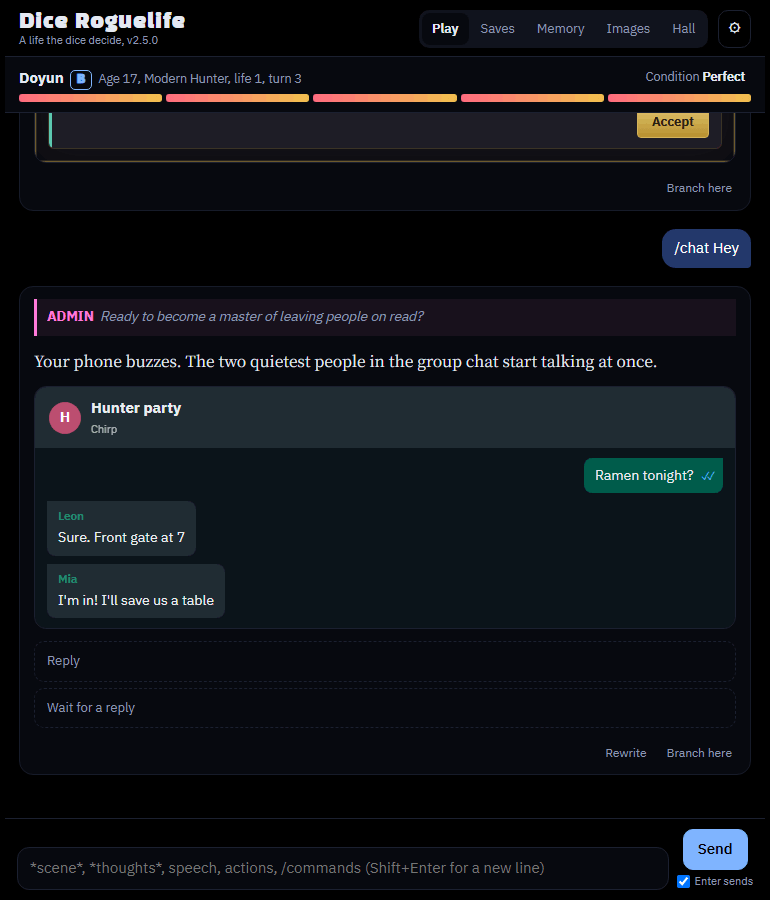
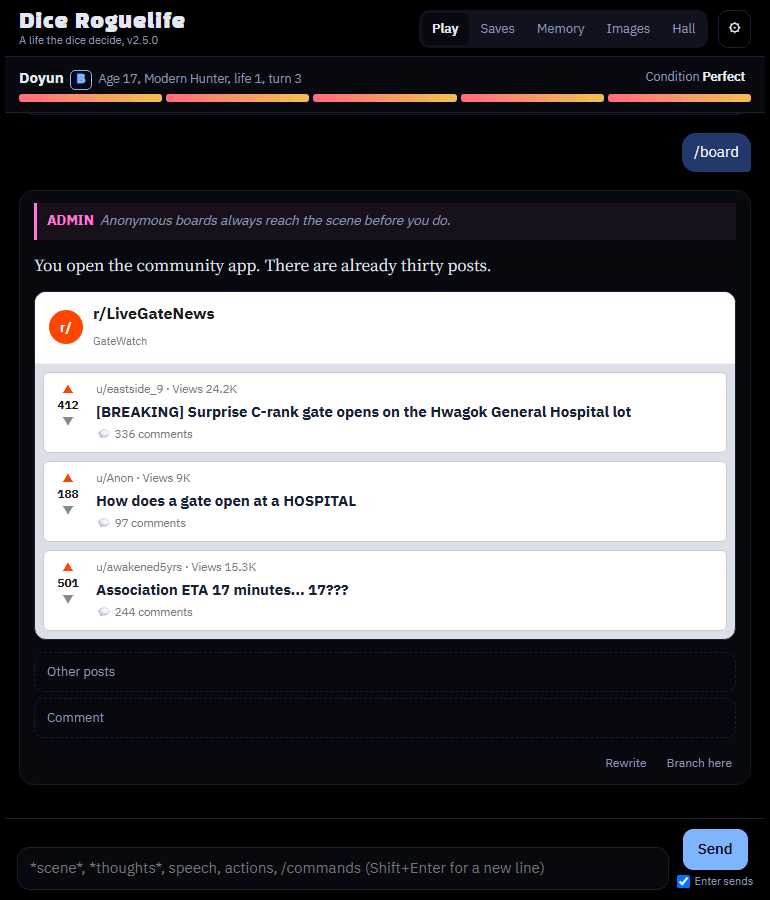
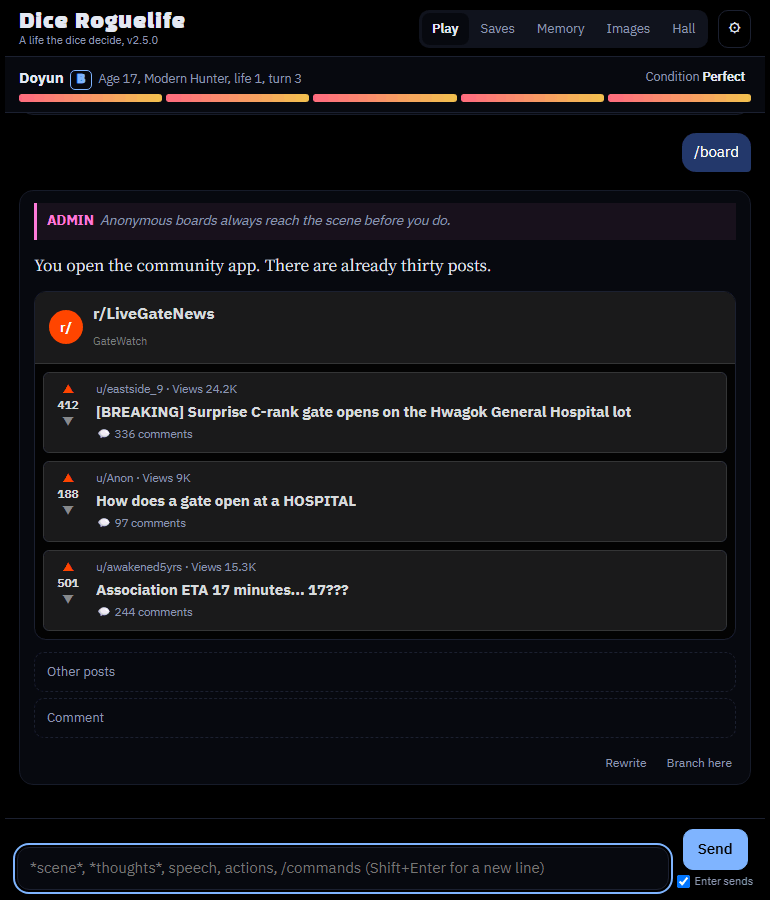
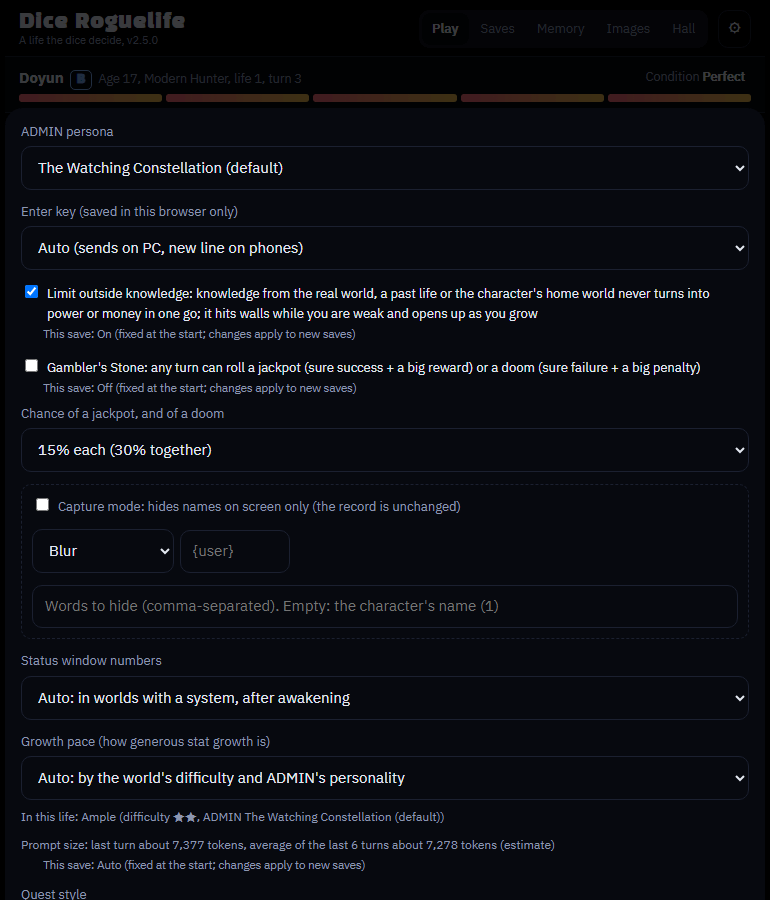
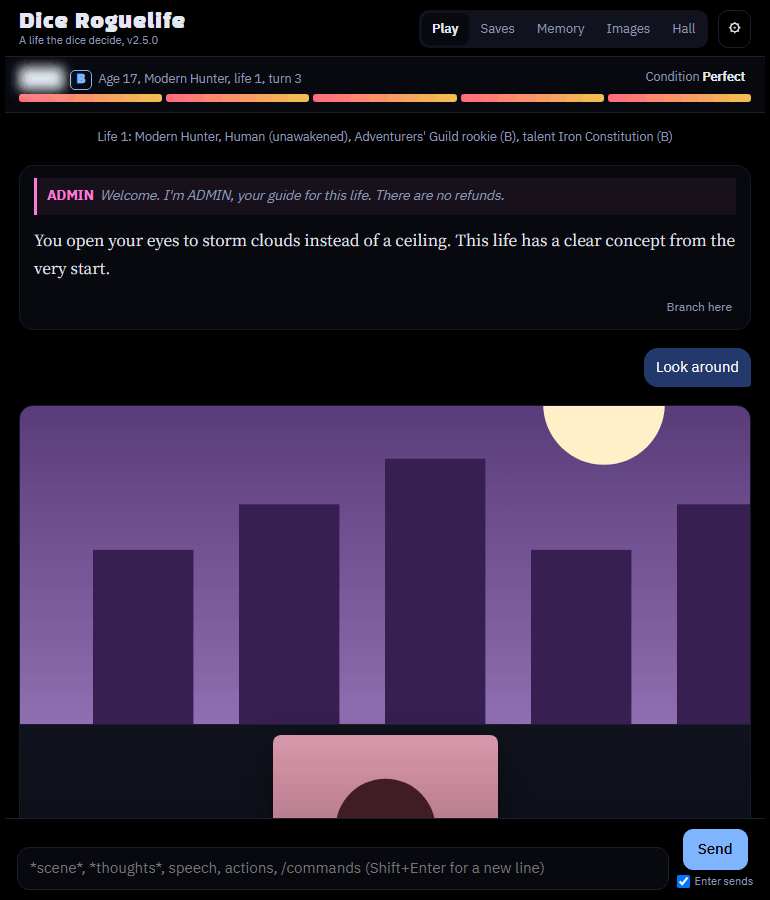
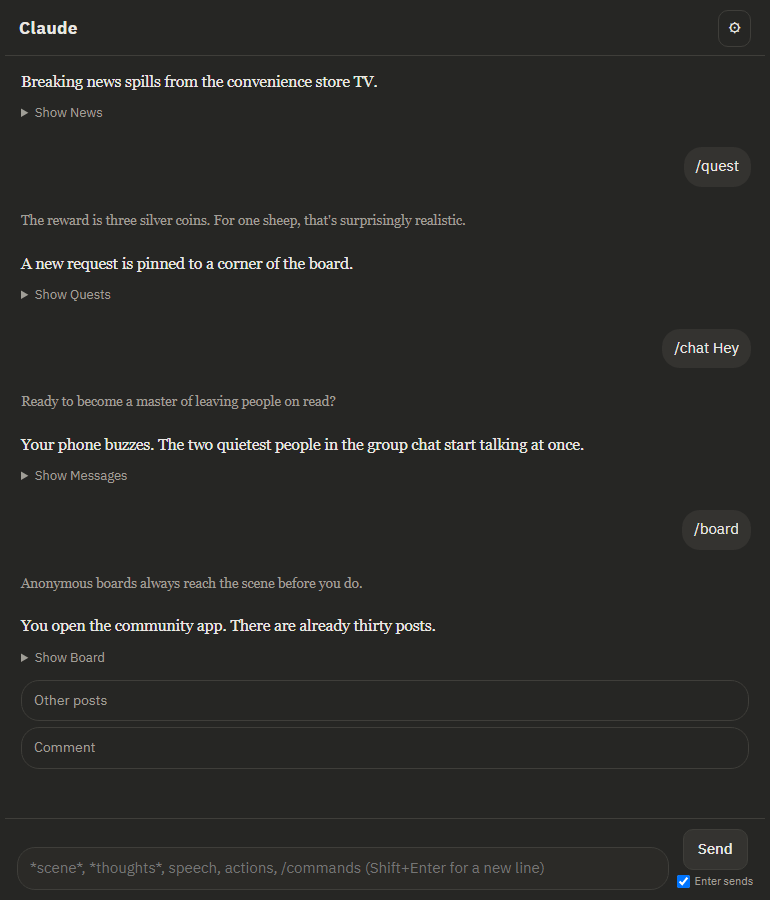
게시판, 메신저 스타일
Board and messenger styles
掲示板とメッセンジャーのスタイル
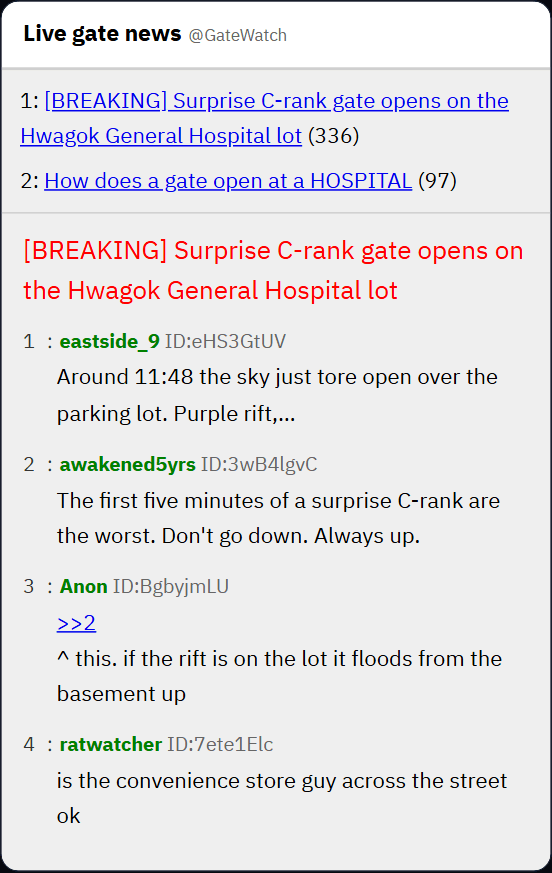
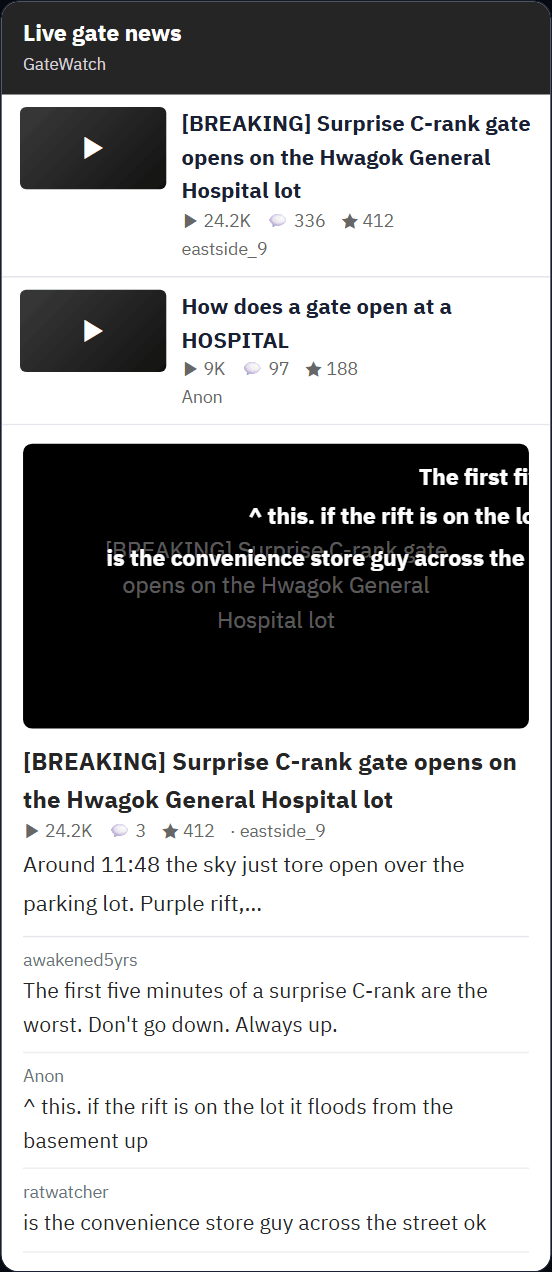
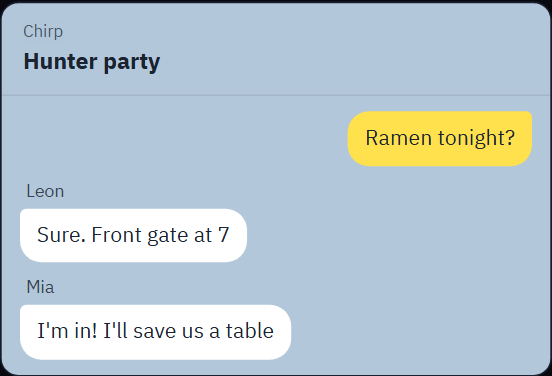
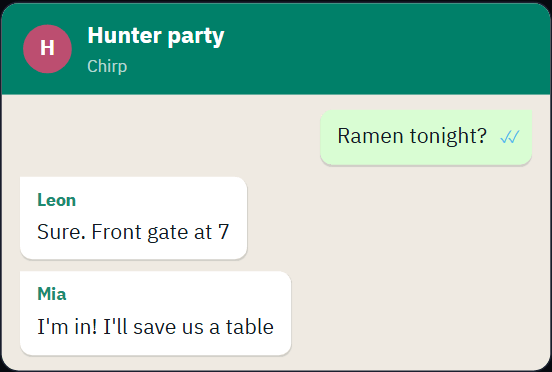
자동이면 이야기 언어에 맞춰요. 한국어는 DC와 카카오톡, 영어는 레딧과 왓츠앱, 일본어는 5ch와 라인이에요. ⚙ 게시판 스타일, 메신저 스타일에서 직접 고를 수도 있어요.
On Auto the look follows the story language: DC Inside and KakaoTalk for Korean, Reddit and WhatsApp for English, 5ch and LINE for Japanese. Or pick one under ⚙ Board style and Messenger style.
自動なら物語の言語に合わせます。韓国語はDCインサイドとカカオトーク、英語はRedditとWhatsApp、日本語は5chとLINEです。⚙の掲示板のスタイルとメッセンジャーのスタイルで選ぶこともできます。
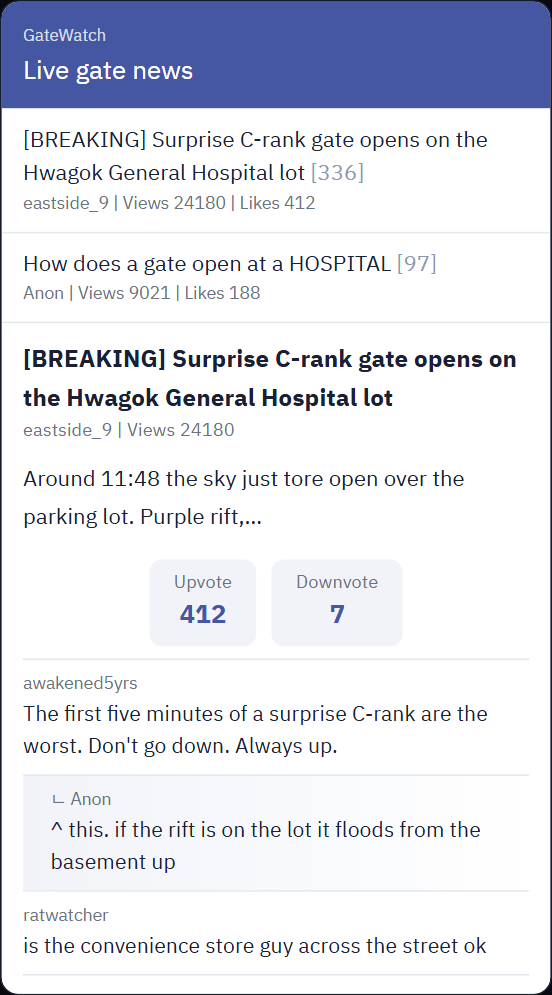
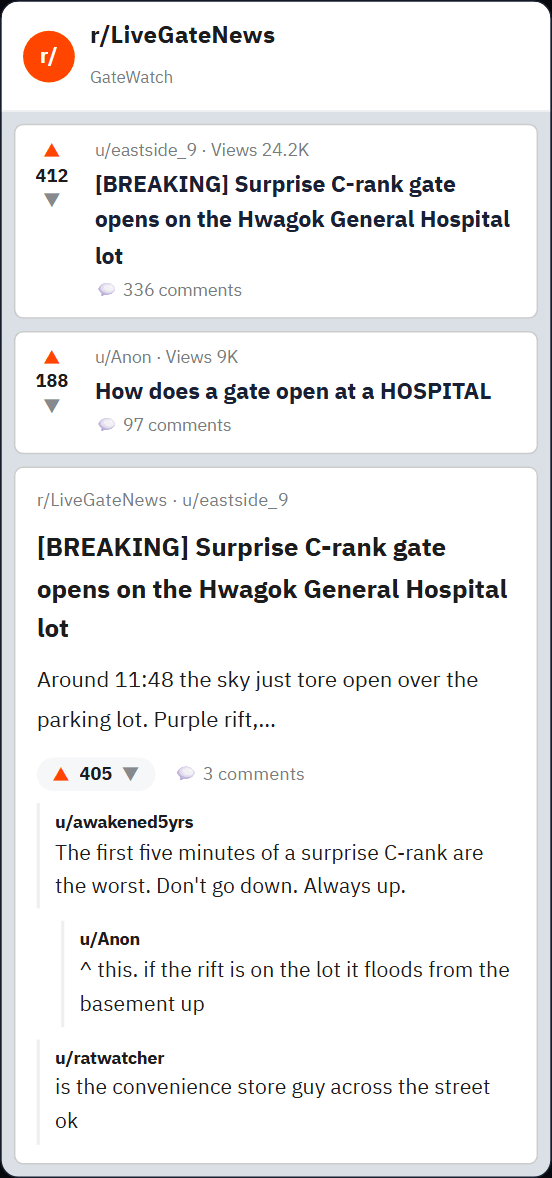
모든 옵션 한 줄 설명
Every option in one line
すべてのオプションを一行で
| 옵션 | 고를 수 있는 값과 설명 |
|---|---|
| 서술 모델 | 빠름, 기본, 깊이 있게 중에서 골라요. 요금제에 따라 한 단계 낮은 모델로 바뀔 수 있어요 ("지금 확인") |
| 서술 분량 | 짧게, 모델에 맡김, 길게 중에서 골라요 |
| 최근 기억 | 원문 그대로 넣는 분량이에요. 작게 20KB, 보통 40KB(기본), 크게 80KB, 아주 크게 150KB 중에서 골라요. 그보다 오래된 내용은 요약해서 넣어요. 클수록 기억은 좋아지지만 느려지고 사용량도 빨리 줄어요 |
| 화면 언어 | English, 한국어, 日本語 중에서 골라요. 화면 전체가 바뀌어요. 처음엔 브라우저 언어를 따라가요 |
| 이야기 언어 | 저장을 열어 두면 그 저장의 언어를 바꿔요(다음 턴부터, 지난 턴은 그대로). 저장이 없을 때는 새 게임의 언어예요(기본은 화면 언어와 같게). 이야기, 대사, 선택지, 위젯이 모두 이 언어로 나와요 |
| 내 입력 문장 교정 보기 | 내가 쓴 문장의 맞춤법과 문법을 한 줄로 보여 줘요 |
| ADMIN 페르소나 | 관전하는 성좌(기본), 성좌 딜러, 무심한 기록관, 과몰입 팬 성좌, 직접 입력 중에서 골라요 |
| 엔터 키 | 자동(PC는 보내기, 폰은 줄바꿈), 엔터로 보내기, 엔터는 줄바꿈 중에서 골라요. 이 브라우저에만 저장돼요 |
| 외부 지식 억제 | 현실이나 전생의 지식이 단번에 힘이나 돈이 되지 않게 해요. 기본값은 켜짐이고, 삶을 시작할 때 정해지면 바꿀 수 없어요 |
| 도박꾼의 초석 | 매 턴 잭팟(무조건 성공+큰 보상) 또는 나락(무조건 실패+큰 페널티)이 뜰 수 있어요. 확률은 10%, 15%, 25% 중에서 골라요. 시작할 때 정해지면 바꿀 수 없어요 |
| 상태창 공개 | 자동, 항상, 모든 세계에서 각성 후, 숨김 중에서 골라요 |
| 성장 속도 | 자동, 짠맛, 보통, 후함 중에서 골라요. 스탯을 얼마나 후하게 주는지 정해요 |
| 의뢰, 뉴스 스타일 | 위의 전후 화면을 보세요 |
| 게시판 스타일 | 자동(이야기 언어에 맞춰), DC, 레딧, 5ch, 니코니코 중에서 골라요 |
| 메신저 스타일 | 자동, 카카오톡, 왓츠앱, 라인 중에서 골라요 |
| 위젯 다크 모드 | 톡과 게시판 위젯도 어둡게 바꿔요 |
| 효과음 | 운명 공개, 경지 상승, 칭호 팡파레, 스킬, 아이템, 의뢰 완료, 사망, 결산 때 소리가 나요 |
| 업데이트 확인 | 새 버전으로 바꿔 달라는 요청 문구를 만들어 줘요 (아래 참고) |
| Option | Values and what they do |
|---|---|
| Language | English, Korean or Japanese, for the whole screen. The game starts in your browser's language |
| Story language | With a save open, changes that save's language (from the next turn; earlier turns stay). With none open, it is the language new games start in (by default the screen's). The narration, dialogue, choices and widgets all come in it |
| Show corrections of my input | Shows a one-line correction of the grammar and spelling in what you wrote |
| Narration model | Fast, Standard or Deep. Your plan may swap in a lower tier ("Check now") |
| Narration length | Short, Up to the model, or Long |
| Recent memory | How much of the recent story goes in word for word: Small 20KB, Medium 40KB (default), Large 80KB or Very large 150KB. Older parts go in as summaries. Bigger remembers more, but is slower and uses your quota faster |
| ADMIN persona | A few built-in personalities, or write your own |
| Enter key | Auto (sends on a computer, new line on a phone), Enter sends, or Enter adds a new line. Saved in this browser only |
| Limit outside knowledge | Knowledge from the real world or a past life doesn't turn into power or money all at once. On by default; fixed once a life starts |
| Gambler's Stone | Any turn may bring a jackpot (guaranteed success and a big reward) or a doom (guaranteed failure and a big penalty), at 10%, 15% or 25% each. Fixed once a life starts |
| Status window numbers | Auto, Always, After awakening in every world, or Hidden |
| Growth pace | Auto, Stingy, Normal or Generous: how freely stats grow |
| Quest and news style | See the before and after screens above |
| Board style | Auto (follows the story language), DC Inside, Reddit, 5ch or Niconico |
| Messenger style | Auto, KakaoTalk, WhatsApp or LINE |
| Widget dark mode | Makes the messenger and board widgets dark too |
| Sound effects | Plays for fate reveals, realm breakthroughs, title fanfares, skills, items, finished quests, death and the Life Review |
| Check for updates | Writes the prompt that asks Claude to update your artifact (see Install and update) |
| オプション | 値と内容 |
|---|---|
| 言語(Language) | 英語、韓国語、日本語。画面全体が切り替わります。最初はブラウザの言語に合わせます |
| 物語の言語 | セーブを開いているときはそのセーブの言語を変えます(次のターンから、これまでのターンはそのまま)。開いていないときは新しいゲームの言語です(初期値は画面と同じ)。語り、台詞、選択肢、ウィジェットがすべてこの言語で出ます |
| 自分の入力の添削を表示 | 自分が書いた文の文法やつづりを一行で直して見せます |
| 語りのモデル | 高速、標準、じっくり。プランによっては低いティアに置き換えられることがあります(「今すぐ確認」) |
| 語りの分量 | 短く、モデルに任せる、長く |
| 最近の記憶 | 最近の物語をそのまま入れる量:小 20KB、中 40KB(初期値)、大 80KB、特大 150KB。それより前は要約で入ります。大きいほどよく覚えますが、遅くなり、利用枠も早く減ります |
| ADMINのペルソナ | いくつかの組み込みの性格から選ぶか、自分で書きます |
| Enterキー | 自動(PCでは送信、スマホでは改行)、Enterで送信、Enterで改行。このブラウザにだけ保存されます |
| 外部知識の制限 | 現実や前世の知識が一度に力やお金になりません。初期状態はオンで、人生を始めると固定されます |
| 賭博師の礎石 | どのターンにも、ジャックポット(必ず成功して大きな報酬)か奈落(必ず失敗して大きなペナルティ)がそれぞれ10%、15%、25%で起こりえます。人生を始めると固定されます |
| ステータスウィンドウの数値 | 自動、常に表示、すべての世界で覚醒後、非表示 |
| 成長ペース | 自動、ケチ、普通、太っ腹。ステータスがどれだけ伸びやすいか |
| 依頼とニュースのスタイル | 上の前後の画面を参照 |
| 掲示板のスタイル | 自動(物語の言語に合わせる)、DCインサイド、Reddit、5ch、ニコニコ |
| メッセンジャーのスタイル | 自動、カカオトーク、WhatsApp、LINE |
| ウィジェットのダークモード | メッセンジャーと掲示板のウィジェットもダークにします |
| 効果音 | 運命の公開、境地の突破、称号のファンファーレ、スキル、アイテム、依頼の完了、死、人生の決算で鳴ります |
| アップデートを確認 | Claudeにアーティファクトの更新を頼む文を作ります(「インストールとアップデート」を参照) |
이미지 태깅 시스템
Image tagging
画像のタグ付け
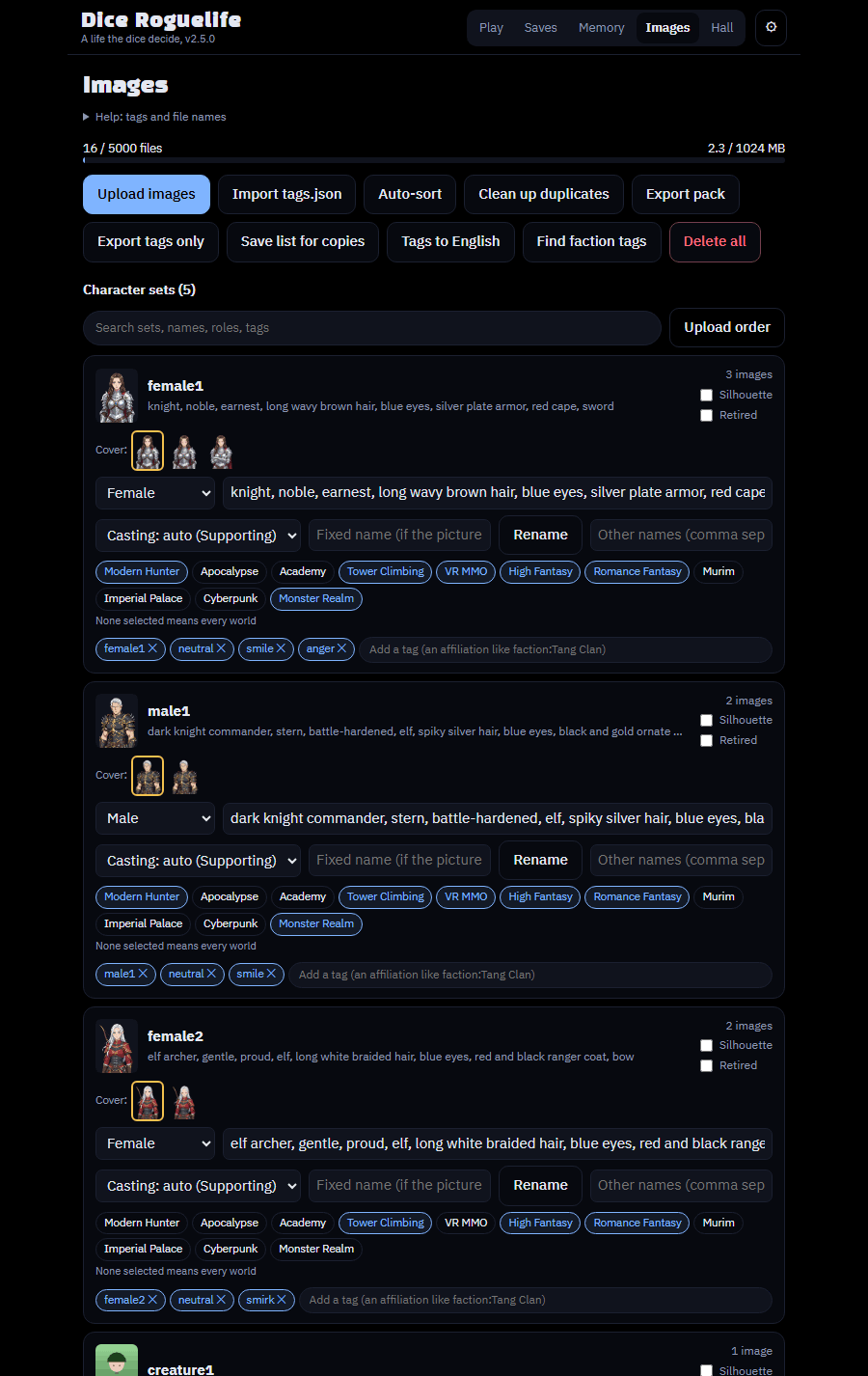
초상화와 배경을 올리면 앱이 장면에 맞춰 알아서 붙여요. 이미지가 없어도 텍스트로 플레이할 수 있어요.
Upload portraits and backgrounds and the app fits them to each scene. You can also play text-only without any images.
立ち絵と背景をアップロードすると、アプリが場面ごとに合わせて表示します。画像なしでテキストだけでも遊べます。
앱이 그림을 고르는 원리
How the app picks pictures
アプリが画像を選ぶしくみ
인물
- 세트 하나가 한 사람이에요. 표정(emotion)은 그 세트 안에서 장면에 맞는 얼굴을 골라요.
- AI가 인물의 성별, 역할, 비중, 외형 단어, 소속을 설명해 줘요.
- 코드가 그 설명을 세트의 태그, 역할, 분위기와 단어 단위로 비교해서 점수를 매겨요.
- 정체 태그
faction:은빛기사단이 맞으면 점수를 크게 더해 줘요. - 세계(worlds)와 성별이 맞는 세트만 후보가 돼요. 많은 세트에 공통으로 들어 있는 단어(hair, smile)는 점수에 반영하지 않아요.
- 비중(tier)이 비슷해도 점수를 더해요. 비중은 엑스트라, 조연, 주요로 나뉘어요.
- 한 번 정해진 얼굴은 그 삶이 끝날 때까지 같은 사람에게 계속 쓰여요.
People
- One set is one person. The emotion picks the face within that set that fits the scene.
- The AI describes each person's gender, role, importance, look words and affiliation.
- The code scores that against each set's tags, role and vibe, word by word.
- An identity tag like
faction:Silver Knightsadds a big bonus when it matches. - Only sets whose worlds and gender fit are candidates. Words shared by many sets (hair, smile) don't count.
- A similar importance (tier) also adds points. Tiers are extra, minor and major.
- Once a face is chosen, it stays with that person for the rest of the life.
人物
- 1セットが1人です。表情によって、そのセットの中から場面に合う顔を選びます。
- AIが各人物の性別、役割、重要度、見た目の言葉、所属を説明します。
- コードがそれを各セットのタグ、役割、雰囲気と単語ごとに照らし合わせて点数をつけます。
faction:Silver Knightsのような所属タグが一致すると大きく加点されます。- 世界と性別が合うセットだけが候補です。多くのセットに共通する言葉(髪、笑顔)は数えません。
- 重要度(ティア)が近いことも加点されます。ティアは extra、minor、major です。
- 一度選ばれた顔は、その人生のあいだずっとその人物に使われます。
배경
- AI가 장소를 영어 단어로 설명해요. 장소 종류를 먼저 적어요 (
station, locker). - 코드가 이 세계의 배경 중에서 찾아봐요. 종류 단어가 전부 들어 있어야 후보가 돼요.
- 시간대(day, night, sunset)에 맞는 버전을 골라요.
- 애매하면 엉뚱한 그림을 붙이느니 그림을 아예 안 붙여요.
- 가 본 곳에는 같은 그림을 다시 써요.
Backgrounds
- The AI describes the place in English words, the kind of place first (
station, locker). - The code searches this world's backgrounds. A background must contain every kind word to be a candidate.
- It picks the version for the time of day (day, night, sunset).
- When unsure, it shows no picture rather than a wrong one.
- A place you've been reuses the same picture.
背景
- AIが場所を英単語で説明します。場所の種類が先です(
station, locker)。 - コードがこの世界の背景を検索します。種類の言葉をすべて含む背景だけが候補です。
- 時間帯(昼、夜、夕方)に合うバージョンを選びます。
- 自信がないときは、間違った画像より画像なしを選びます。
- 一度行った場所は同じ画像を使います。
파일 이름 규칙
File names
ファイル名
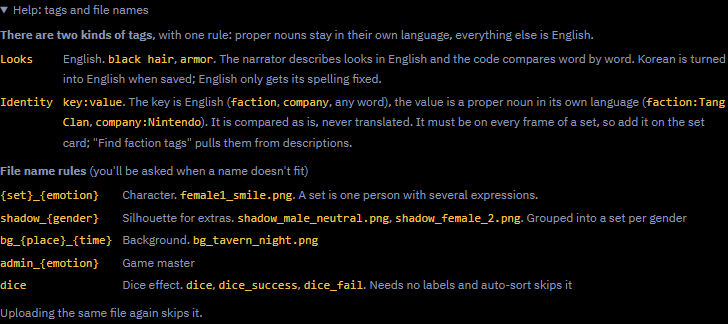
| 종류 | 이름 | 예 |
|---|---|---|
| 캐릭터 | {세트}_{표정}.png | female1_smile.png |
| 같은 표정 둘째 장 | {세트}_{표정}_2.png | female1_smile_2.png (smile2도 지금은 인식해요) |
| 다른 의상 | {세트}_{표정}_{의상}.png | female1_smile_armor.png |
| 배경 | bg_{장소}_{시간}.png | bg_tavern_night.png, bg_castle-gate_day.png |
| 그림자 | shadow_{male|female}_{표정}.png | shadow_male_neutral.png |
| 게임 마스터 | admin_{표정}.png | admin_smirk.png |
| 연출 (주사위) | dice.png dice_success.png dice_fail.png fx_*.png | 대성공이나 대실패일 때만 나와요 |
| Kind | Name | Example |
|---|---|---|
| Character | {set}_{emotion}.png | female1_smile.png |
| Second image, same emotion | {set}_{emotion}_2.png | female1_smile_2.png (smile2 is still recognized for now) |
| Another outfit | {set}_{emotion}_{outfit}.png | female1_smile_armor.png |
| Background | bg_{place}_{time}.png | bg_tavern_night.png, bg_castle-gate_day.png |
| Shadow | shadow_{male|female}_{emotion}.png | shadow_male_neutral.png |
| Game master | admin_{emotion}.png | admin_smirk.png |
| Effects (dice) | dice.png dice_success.png dice_fail.png fx_*.png | Shown only on a critical success or failure |
| 種類 | 名前 | 例 |
|---|---|---|
| キャラクター | {set}_{emotion}.png | female1_smile.png |
| 同じ表情の2枚目 | {set}_{emotion}_2.png | female1_smile_2.png(smile2 も当面は認識されます) |
| 別の衣装 | {set}_{emotion}_{outfit}.png | female1_smile_armor.png |
| 背景 | bg_{place}_{time}.png | bg_tavern_night.png、bg_castle-gate_day.png |
| シルエット | shadow_{male|female}_{emotion}.png | shadow_male_neutral.png |
| ゲームマスター | admin_{emotion}.png | admin_smirk.png |
| 演出(ダイス) | dice.png dice_success.png dice_fail.png fx_*.png | 大成功・大失敗のときだけ表示されます |
표정은 neutral smile joy anger sadness surprise smirk shy fear serious crying determined 중 하나로 써요. 이름이 규칙에 맞지 않으면 올릴 때 물어봐요. 같은 파일(내용이나 이름이 같은 것)을 다시 올리면 건너뛰어요.
Use one of neutral smile joy anger sadness surprise smirk shy fear serious crying determined as the emotion. If a name doesn't follow the rules, the app asks when you upload. Uploading the same file again (same content or name) is skipped.
表情は neutral smile joy anger sadness surprise smirk shy fear serious crying determined のどれかを使います。名前がルールに沿っていない場合は、アップロード時にアプリが確認します。同じファイル(内容か名前が同じ)をもう一度アップロードするとスキップされます。
tags.json
tags.json
tags.json
- 이미지 탭 → tags.json 가져오기를 누르면 세트 정보와 태그를 한 번에 넣을 수 있어요.
- sets: gender(male/female/other), worlds, role, vibe, look, tier(extra/minor/major), tags, name, aliases
- images: 파일 이름별 emotion, tags, worlds
- backgrounds: 파일 이름별 place, time, mood, tags, worlds
- 태그는 이렇게 써요. 묘사는 영어 소문자로 3~6개 적고, 고유명사만 원래 언어로 적어요. 정체 태그는
key:value형태예요 (예:faction:사천당가).
- Images tab → Import tags.json adds set details and tags in one go.
- sets: gender (male/female/other), worlds, role, vibe, look, tier (extra/minor/major), tags, name, aliases
- images: emotion, tags and worlds per file name
- backgrounds: place, time, mood, tags and worlds per file name
- Tags: 3 to 6 descriptive tags in lowercase English; only proper nouns stay in their own language. Identity tags look like
key:value(e.g.faction:Tang Clan).
- 画像タブ → tags.jsonを読み込むで、セットの情報とタグを一度に追加できます。
- sets:gender(male/female/other)、worlds、role、vibe、look、tier(extra/minor/major)、tags、name、aliases
- images:ファイル名ごとの emotion、tags、worlds
- backgrounds:ファイル名ごとの place、time、mood、tags、worlds
- タグ:小文字の英語で説明タグを3〜6個。固有名詞だけは元の言語のままです。所属タグは
key:valueの形です(例:faction:Tang Clan)。
팩 내보내기
Export pack
パックを書き出し
- 팩 내보내기는 이미지를 올릴 때 쓰는 이름으로 zip에 담고 tags.json까지 넣어서 내려받아요. 다른 아티팩트나 친구에게 그대로 옮길 수 있어요.
- 태그만 내보내기는 이미지 없이 tags.json만 내려받아요.
- 이미지는 아티팩트마다 따로 저장돼요. 그래서 새 링크로 옮길 때는 이 팩을 다시 올리면 돼요.
- Export pack downloads a zip with the images under their upload names, plus tags.json. Move it as is to another artifact or to a friend.
- Export tags only downloads just tags.json, without the images.
- Images are stored per artifact, so when you move to a new link, upload this pack again.
- パックを書き出すで、アップロード時の名前のままの画像と tags.json をzipでダウンロードします。そのまま別のアーティファクトや友達に渡せます。
- タグだけ書き出しは、画像なしで tags.json だけをダウンロードします。
- 画像はアーティファクトごとに保存されるので、新しいリンクに移るときはこのパックをもう一度アップロードしてください。
Claude에게 정리 맡기기 (프롬프트)
Let Claude organize them (prompt)
Claudeに整理してもらう(プロンプト)
이미지 폴더를 Claude(Cowork 등)에 주고 아래 프롬프트를 붙여 넣으면, 이름 짓기와 세트 묶기, tags.json 만들기까지 해 줘요. 먼저 계획(PLAN.md)을 보여 주고 내가 확인하면 진행해요.
Give an image folder to Claude (Cowork, for example) with the prompt below, and it names the files, groups the sets and writes tags.json. It shows you a plan (PLAN.md) first and goes ahead once you OK it.
画像フォルダーを下のプロンプトと一緒にClaude(たとえばCowork)に渡すと、ファイル名を付け、セットにまとめ、tags.json を書いてくれます。先に計画(PLAN.md)を見せ、OKすると進めます。
프롬프트 펼치기 / 복사Show / copy the promptプロンプトを表示 / コピー
Organize and tag the images in this folder for the game "Dice Roguelife" (주사위가 정한 인생).

Goal: group images of the same character into "sets", name every file with the game's
convention, and write a tags.json the app can import (이미지 tab -> import).

Rules
1. Do NOT modify or delete the originals. Copy everything into ./organized/.
2. First look at every image and write a plan to ./organized/PLAN.md
   (old filename -> new filename, plus tags). Show me a summary and wait for my OK
   before copying or renaming anything.
3. If ./existing_filenames.txt exists (optional), it lists files already in my game library.
   New names must never collide with it; continue set numbers after the highest one there.
4. Also write ./organized/MAPPING.csv with two columns: original_filename,new_filename.

Characters (portraits or sprites of a person or creature)
- Group images of the same character (same face, hair, outfit design) into one set.
- Set names: female1, female2, male1, male2, ... (creature1 for non-humans).
  Letters, digits and hyphens only.
- Filename: {set}_{emotion}.{ext}, e.g. female1_smile.png
- Emotion must be one of: neutral, smile, joy, anger, sadness, surprise, smirk,
  shy, fear, serious, crying, determined. Pick the closest one.
- Two images with the same emotion in a set: add a number after an underscore,
  female1_smile_2.png (never female1_smile2.png; the app would not recognize the emotion).
- Alternate outfit: add it after the emotion, female1_smile_armor.png
- If a name is written in the image, read it exactly. Put the in-game Korean name in
  "name" and the original spelling in "aliases". If unreadable, do not guess; flag it.

Backgrounds (scenes without a main character)
- Filename: bg_{place}_{time}.{ext}, e.g. bg_tavern_night.png, bg_castle-gate_day.png
- place: lowercase English, hyphens between words. time: day, sunset, night or indoor.
- Two backgrounds with the same place and time: add a number, bg_alley_day2.png
- A specific landmark (e.g. a school auditorium) goes in tags, not in a new field.

Effects (dice or effect art that is neither a character nor a scene)
- Name them dice.png, dice_success.png, dice_fail.png, or fx_{what}.png. No tags needed.

Skip files that are already named as system assets: shadow_*, admin_*, dice*, fx*.

Worlds (for "worlds", 0 to 3 that clearly fit; empty array if it fits anywhere):
hunter, apoc, academy, tower, vrmmo, fantasy, rofan, murim, palace, cyber, monster

Tags
- Descriptive tags: lowercase English, 3 to 6 (hair, outfit, props, mood; for backgrounds:
  place, time of day, weather, mood).
- Identity tags (optional): key:value, key in English, value is a proper noun kept in its
  original language, e.g. faction:사천당가
- Only proper nouns stay in their own language; everything else is English.

tags.json (keyed by the NEW filenames)
{
  "sets": {
    "female1": {"gender": "female", "worlds": ["fantasy"], "role": "knight",
                "vibe": "stern, loyal", "look": "silver hair, blue armor",
                "tier": "major", "tags": ["silver hair", "knight"]}
  },
  "images": {
    "female1_smile.png": {"emotion": "smile", "tags": ["smile", "armor"], "worlds": ["fantasy"]}
  },
  "backgrounds": {
    "bg_tavern_night.png": {"place": "tavern", "time": "night", "mood": ["lively", "warm"],
                            "tags": ["wooden tables", "lanterns"], "worlds": ["fantasy"]}
  }
}
- gender: male, female, or other (for non-humans).
- tier: extra, minor or major (how prominent the face is).
- Keep role, vibe and look short; the app joins them into one line of at most 120 characters.
- "name" and "aliases" only for sets with a readable name in the image.

Also
- If one image contains several characters or a grid of expressions, flag it in PLAN.md
  instead of guessing.
- Flag duplicates or near-duplicates.
- At the end, print a short summary: number of sets, images per set, backgrounds per world,
  and everything flagged.
Organize and tag the images in this folder for the game "Dice Roguelife".

Goal: group images of the same character into "sets", name every file with the game's
convention, and write a tags.json the app can import (Images tab -> Import tags.json).

Rules
1. Do NOT modify or delete the originals. Copy everything into ./organized/.
2. First look at every image and write a plan to ./organized/PLAN.md
   (old filename -> new filename, plus tags). Show me a summary and wait for my OK
   before copying or renaming anything.
3. If ./existing_filenames.txt exists (optional), it lists files already in my game library.
   New names must never collide with it; continue set numbers after the highest one there.
4. Also write ./organized/MAPPING.csv with two columns: original_filename,new_filename.

Characters (portraits or sprites of a person or creature)
- Group images of the same character (same face, hair, outfit design) into one set.
- Set names: female1, female2, male1, male2, ... (creature1 for non-humans).
  Letters, digits and hyphens only.
- Filename: {set}_{emotion}.{ext}, e.g. female1_smile.png
- Emotion must be one of: neutral, smile, joy, anger, sadness, surprise, smirk,
  shy, fear, serious, crying, determined. Pick the closest one.
- Two images with the same emotion in a set: add a number after an underscore,
  female1_smile_2.png (never female1_smile2.png; the app would not recognize the emotion).
- Alternate outfit: add it after the emotion, female1_smile_armor.png
- If a name is written in the image, read it exactly. Put the name the game should use in
  "name" and any other spellings in "aliases". If unreadable, do not guess; flag it.

Backgrounds (scenes without a main character)
- Filename: bg_{place}_{time}.{ext}, e.g. bg_tavern_night.png, bg_castle-gate_day.png
- place: lowercase English, hyphens between words. time: day, sunset, night or indoor.
- Two backgrounds with the same place and time: add a number, bg_alley_day2.png
- A specific landmark (e.g. a school auditorium) goes in tags, not in a new field.

Effects (dice or effect art that is neither a character nor a scene)
- Name them dice.png, dice_success.png, dice_fail.png, or fx_{what}.png. No tags needed.

Skip files that are already named as system assets: shadow_*, admin_*, dice*, fx*.

Worlds (for "worlds", 0 to 3 that clearly fit; empty array if it fits anywhere):
hunter, apoc, academy, tower, vrmmo, fantasy, rofan, murim, palace, cyber, monster

Tags
- Descriptive tags: lowercase English, 3 to 6 (hair, outfit, props, mood; for backgrounds:
  place, time of day, weather, mood).
- Identity tags (optional): key:value, key in English, value is a proper noun kept in its
  original language, e.g. faction:Tang Clan
- Only proper nouns stay in their own language; everything else is English.

tags.json (keyed by the NEW filenames)
{
  "sets": {
    "female1": {"gender": "female", "worlds": ["fantasy"], "role": "knight",
                "vibe": "stern, loyal", "look": "silver hair, blue armor",
                "tier": "major", "tags": ["silver hair", "knight"]}
  },
  "images": {
    "female1_smile.png": {"emotion": "smile", "tags": ["smile", "armor"], "worlds": ["fantasy"]}
  },
  "backgrounds": {
    "bg_tavern_night.png": {"place": "tavern", "time": "night", "mood": ["lively", "warm"],
                            "tags": ["wooden tables", "lanterns"], "worlds": ["fantasy"]}
  }
}
- gender: male, female, or other (for non-humans).
- tier: extra, minor or major (how prominent the face is).
- Keep role, vibe and look short; the app joins them into one line of at most 120 characters.
- "name" and "aliases" only for sets with a readable name in the image.

Also
- If one image contains several characters or a grid of expressions, flag it in PLAN.md
  instead of guessing.
- Flag duplicates or near-duplicates.
- At the end, print a short summary: number of sets, images per set, backgrounds per world,
  and everything flagged.
ゲーム「Dice Roguelife」用に、このフォルダーの画像を整理してタグを付けてください。
目的:同じキャラクターの画像を「セット」にまとめ、すべてのファイルにゲームの命名規則どおりの名前を付け、
アプリが取り込める tags.json を書くこと(画像タブ → tags.json を読み込み)。
ルール
1. 元のファイルは変更も削除もしないでください。すべて ./organized/ にコピーします。
2. まずすべての画像を見て、計画を ./organized/PLAN.md に書いてください
(元のファイル名 -> 新しいファイル名、タグ)。要約を見せて、私がOKするまでは
コピーも名前の変更もしないでください。
3. ./existing_filenames.txt があれば(任意)、ゲームのライブラリにすでにあるファイルの一覧です。
新しい名前がそれと重ならないようにし、セット番号はそこにある最大の番号の続きから振ってください。
4. ./organized/MAPPING.csv も書いてください。列は original_filename,new_filename の2つです。
キャラクター(人や生き物の立ち絵・立ち絵)
- 同じキャラクター(同じ顔、髪、衣装のデザイン)の画像を1つのセットにまとめます。
- セット名:female1、female2、male1、male2、…(人間以外は creature1)。
英字、数字、ハイフンだけを使います。
- ファイル名:{set}_{emotion}.{ext} 例:female1_smile.png
- emotion は次のどれか:neutral、smile、joy、anger、sadness、surprise、smirk、
shy、fear、serious、crying、determined。いちばん近いものを選んでください。
- セット内に同じ表情が2枚あるときは、アンダースコアのあとに番号を付けます:
female1_smile_2.png(female1_smile2.png は不可。アプリが表情を認識できません)。
- 別の衣装:表情のあとに付けます。female1_smile_armor.png
- 画像に名前が書かれていれば、正確に読み取ってください。ゲームで使う名前を "name" に、
ほかの表記を "aliases" に入れます。読めなければ推測せず、フラグを立ててください。
背景(主役のいない場面)
- ファイル名:bg_{place}_{time}.{ext} 例:bg_tavern_night.png、bg_castle-gate_day.png
- place:小文字の英語、単語の間はハイフン。time:day、sunset、night、indoor のどれか。
- 場所と時間が同じ背景が2枚あるときは番号を付けます:bg_alley_day2.png
- 特定の名所(例:学校の講堂)は新しい項目にせず、tags に入れます。
演出(キャラクターでも場面でもないダイスや演出の画像)
- dice.png、dice_success.png、dice_fail.png、または fx_{what}.png と名付けます。タグは不要です。
すでにシステム素材の名前になっているファイルはスキップ:shadow_*、admin_*、dice*、fx*。
世界("worlds" 用、明らかに合うものを0〜3個。どこにでも合うなら空の配列):
hunter, apoc, academy, tower, vrmmo, fantasy, rofan, murim, palace, cyber, monster
タグ
- 説明タグ:小文字の英語で3〜6個(髪、衣装、小物、雰囲気。背景なら場所、時間帯、天気、雰囲気)。
- 所属タグ(任意):key:value。key は英語、value は元の言語のままの固有名詞
例:faction:Tang Clan
- 元の言語のままにするのは固有名詞だけで、それ以外はすべて英語です。
tags.json(キーは新しいファイル名)
{
"sets": {
"female1": {"gender": "female", "worlds": ["fantasy"], "role": "knight",
"vibe": "stern, loyal", "look": "silver hair, blue armor",
"tier": "major", "tags": ["silver hair", "knight"]}
},
"images": {
"female1_smile.png": {"emotion": "smile", "tags": ["smile", "armor"], "worlds": ["fantasy"]}
},
"backgrounds": {
"bg_tavern_night.png": {"place": "tavern", "time": "night", "mood": ["lively", "warm"],
"tags": ["wooden tables", "lanterns"], "worlds": ["fantasy"]}
}
}
- gender:male、female、または other(人間以外)。
- tier:extra、minor、major(その顔がどれだけ目立つか)。
- role、vibe、look は短く。アプリがこれらを最大120文字の1行にまとめます。
- "name" と "aliases" は、画像に読める名前があるセットにだけ付けます。
ほかに
- 1枚に複数のキャラクターや表情の一覧が入っている画像は、推測せず PLAN.md でフラグを立ててください。
- 重複やほぼ同じ画像にもフラグを立ててください。
- 最後に短い要約を出してください:セットの数、セットごとの画像数、世界ごとの背景数、
フラグを立てたものすべて。
그림자 (shadow)
Silhouettes
シルエット
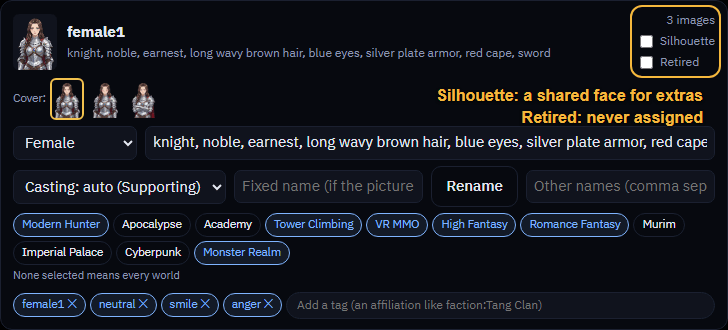
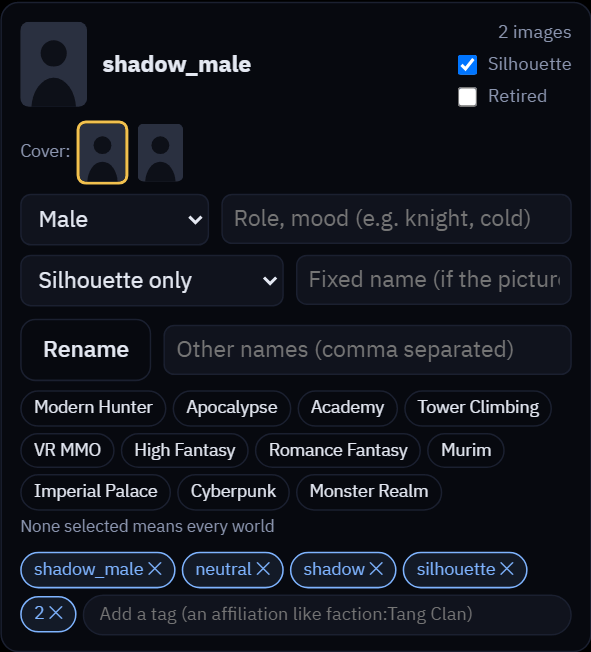
shadow_male 세트예요. 그림자가 켜지고 배역이 전용 그림자로 바뀌어 있어요.shadow_male set. Silhouette is on and its role reads Silhouette only.shadow_male セットです。シルエットがオンで、役割がシルエット専用になっています。- 무엇인가요? 얼굴 없는 실루엣 세트예요. 여러 배경 인물이 함께 써요.
- 어디에 쓰이나요? 엑스트라(지나가는 사람)에게 공용 실루엣이 붙어요. 정체를 숨긴 화자도 실루엣으로 나와요. 조연이나 주요 인물에게는 쓰지 않아요.
- 만드는 방법 1: 파일 이름을
shadow_male_neutral.png,shadow_female_2.png처럼 지어요.shadow,generic,silhouette접두사를 쓸 수 있고, 성별별로shadow_male,shadow_female,shadow_other세트가 자동으로 만들어져요. - 만드는 방법 2: 아무 세트 카드에서 그림자를 체크해요. 그 세트는 실루엣 전용이 되어서 실제 얼굴로는 쓰이지 않아요.
shadow_이름의 세트와 고정 이름이 있는 세트는 체크할 수 없어요. - 제외를 체크하면 그 세트는 자동으로 누구에게도 배정되지 않아요.
- 왜 올려 두나요? 엑스트라용 얼굴이 다 떨어지면 "엑스트라에게 줄 얼굴이 다 떨어졌어요. 그림자(shadow_)나 엑스트라 이미지를 더 올리면 다시 붙어요"라는 안내가 떠요. 그림자를 몇 장 올려 두면 해결돼요.
- What is it? A faceless silhouette set that many background people share.
- Where is it used? Extras (passers-by) get a shared silhouette, and so does a speaker whose identity is hidden. Never for supporting or major characters.
- Make one, way 1: name the files like
shadow_male_neutral.pngorshadow_female_2.png. The prefixesshadow,genericandsilhouetteall work, and theshadow_male,shadow_femaleandshadow_othersets are made automatically. - Make one, way 2: tick Silhouette on any set card. That set becomes silhouette-only and is never used as a real face. Sets named
shadow_and sets with a fixed name can't be ticked. - Tick Retired and the set is never assigned to anyone automatically.
- Why upload them? When the faces for extras run out, the app says so and asks for more silhouette (shadow_) or extra images. A few shadows fix it.
- これは何? 顔のないシルエットのセットで、大勢の背景人物が共有します。
- どこで使う? エキストラ(通行人)と、正体を隠している話し手に共有のシルエットが付きます。脇役や主要人物には使いません。
- 作り方その1:
shadow_male_neutral.pngやshadow_female_2.pngのような名前にします。接頭辞はshadow、generic、silhouetteのどれでもよく、shadow_male、shadow_female、shadow_otherのセットが自動で作られます。 - 作り方その2:好きなセットカードでシルエットにチェックします。そのセットはシルエット専用になり、実際の顔としては使われません。
shadow_という名前のセットと、固定名のあるセットはチェックできません。 - 除外にチェックすると、そのセットは誰にも自動で割り当てられません。
- なぜアップロードする? エキストラの顔が足りなくなると、アプリがそう知らせて、シルエット(shadow_)かエキストラの画像を追加するよう求めます。シルエットが何枚かあれば解決します。
잘못 등록된 이미지 고치기
Fixing mislabeled images
間違ったラベルを直す
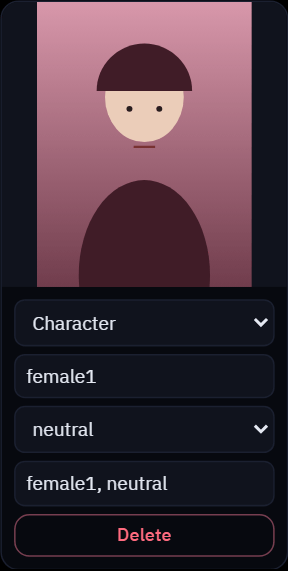
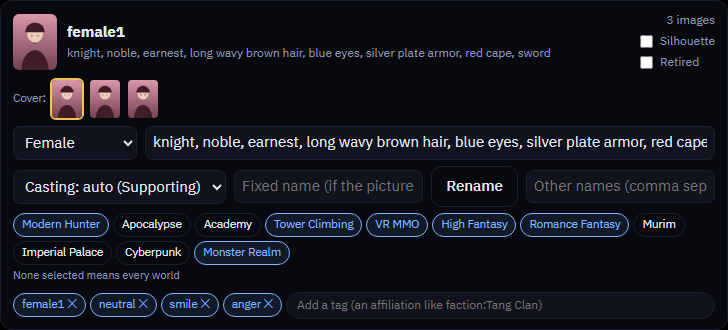

- 종류, 세트, 표정이 틀렸다면 카드의 드롭다운에서 바꾸세요.
- 태그가 틀렸다면 태그 칸에서 고치거나 ✕로 지우세요. 영어가 아닌 태그는 태그 영어로 버튼으로 한 번에 바꿀 수 있어요.
- 소속(문파, 가문, 회사)을 태그로 만들고 싶다면 소속 태그 뽑기를 누르세요. 적용하기 전에 목록을 보여 줘요.
- 분류를 AI가 다시 하게 하고 싶다면 자동 분류를 누르세요.
- 같은 그림이 두 번 올라갔다면 중복 정리를 누르세요. 먼저 올린 쪽만 남아요.
- 그림을 바꾸고 싶다면, 같은 이름이나 같은 내용의 파일은 건너뛰기 때문에 그냥 다시 올리면 안 돼요. 카드에서 삭제한 뒤 새 그림을 올리세요. 삭제한 다음에는 같은 파일 이름도 쓸 수 있어요.
- Wrong kind, set or emotion? Change it in the card's dropdowns.
- Wrong tags? Fix them in the tag field or remove one with ✕. Tags to English converts every non-English tag at once.
- Want affiliations (sect, house, company) as tags? Press Find faction tags; it shows you the list before applying it.
- Want the AI to sort them again? Press Auto-sort.
- Uploaded the same picture twice? Press Clean up duplicates; the first upload stays.
- To replace a picture, don't just upload it again: files with the same name or content are skipped. Delete it from its card first, then upload the new one. After deleting, the same file name is free again.
- 種類、セット、表情が違う? カードのドロップダウンで変えてください。
- タグが違う? タグ欄で直すか、✕で1つ消します。タグを英語にで、英語以外のタグを一度に変換します。
- 所属(宗派、家門、会社)をタグにしたい? 勢力タグ抽出を押すと、適用する前に一覧を見せてくれます。
- AIにもう一度分類させたい? 自動分類を押します。
- 同じ画像を2回アップロードした? 重複整理を押すと、最初にアップロードしたものが残ります。
- 画像を差し替えるときは、そのままアップロードし直さないでください。同じ名前や内容のファイルはスキップされます。先にカードから削除してから、新しい画像をアップロードします。削除すると同じファイル名がまた使えます。
이미지 구하는 법
Finding images
画像の探し方
이 저장소에는 이미지가 들어 있지 않아요. 직접 구해서 올려야 해요.
This repository has no images. Find your own and upload them.
このリポジトリには画像が入っていません。自分で探してアップロードしてください。
- AI로 만들기: NovelAI 같은 애니 스타일 생성 서비스를 추천해요. 사이트 안내에 따르면 생성한 이미지는 상업적으로 써도 제한이 없다고 해요. 쓰기 전에 약관을 직접 확인하세요.
- 무료, 오픈 라이선스 소재: OpenGameArt에서 CC0, CC-BY 같은 라이선스별로 찾아볼 수 있어요. 작품마다 붙은 라이선스를 꼭 확인하세요.
- itch.io 에셋은 아래 목록에 정리했어요. 작가가 밝힌 라이선스를 각 페이지에서 확인하세요.
- 라이선스는 작가가 밝힌 대로 따라야 해요. 쓰기 전에 각 페이지를 직접 확인하세요.
- Make them with AI: an anime-style generator such as NovelAI is a good choice. According to the site, generated images can be used commercially without restriction. Check the terms yourself before using them.
- Free, openly licensed art: OpenGameArt lets you browse by license, such as CC0 or CC-BY. Always check each work's license.
- itch.io assets are listed below. Check the license the artist states on each page.
- Follow licenses as the artist states them. Check each page yourself before using anything.
- AIで作る:NovelAI のようなアニメ調の生成サービスがおすすめです。サイトによれば、生成した画像は制限なく商用利用できます。使う前に規約を自分で確認してください。
- 自由に使えるライセンスの素材:OpenGameArt では CC0 や CC-BY などライセンス別に探せます。作品ごとのライセンスを必ず確認してください。
- itch.io の素材は下にまとめました。各ページで作者が示すライセンスを確認してください。
- ライセンスは作者が示すとおりに守ってください。使う前に各ページを自分で確認しましょう。
아래는 직접 써 본 예시예요. 이 밖에도 쓸 만한 팩이 더 많이 있어요.
Below are examples I've used myself. There are many more good packs out there.
下は私が実際に使った例です。良いパックはほかにもたくさんあります。
무료 팩 무료
Free packs Free
無料パック 無料
| 이름 | 내용 | 라이선스 (작가 표기) |
|---|---|---|
| TuLune2204 · Free Fantasy Knight Pack | 기사 캐릭터 3명, 표정 9종, 배경 1장이 들어 있어요 | "Free for commercial and personal projects. Credit appreciated but not required." |
| BrightPixel · 4K 배경 팩 | 다크 판타지, 사이버펑크, SF 배경이에요. 데모 샘플만 무료예요. | 쓰기 전에 페이지에서 직접 확인해 주세요 |
| 무료 애니 VN 스프라이트 모음 | 단일 캐릭터 팩이 많고 무협 한복 스프라이트도 있어요 (둘러보기) | 팩마다 다름 |
| 무료 VN 배경 모음 | 판타지 숲, 마법학교 등. 같은 작가 시리즈는 크기와 스타일이 맞아요 (둘러보기) | 팩마다 다름 |
| Name | Contents | License (as the artist states) |
|---|---|---|
| TuLune2204 · Free Fantasy Knight Pack | 3 knight characters, 9 expressions and 1 background | "Free for commercial and personal projects. Credit appreciated but not required." |
| BrightPixel · 4K background packs | Dark fantasy, cyberpunk and sci-fi backgrounds. Only the demo samples are free. | Check the page before using them |
| Free anime VN sprites | Lots of single-character packs, including martial-arts hanfu sprites (browse) | Varies by pack |
| Free VN backgrounds | Fantasy forests, magic schools and more. Series by the same artist match in size and style (browse) | Varies by pack |
| 名前 | 内容 | ライセンス(作者の表記) |
|---|---|---|
| TuLune2204 · Free Fantasy Knight Pack | 騎士キャラクター3人、表情9種、背景1枚 | "Free for commercial and personal projects. Credit appreciated but not required." |
| BrightPixel · 4K background packs | ダークファンタジー、サイバーパンク、SFの背景。無料なのはデモのサンプルだけです。 | 使う前にページを確認してください |
| Free anime VN sprites | 一人用のパックが多数。武侠の漢服スプライトもあります(一覧) | パックによって異なる |
| Free VN backgrounds | ファンタジーの森、魔法学校など。同じ作者のシリーズはサイズと画風がそろっています(一覧) | パックによって異なる |
유료 팩 유료
Paid packs Paid
有料パック 有料
| 이름 | 내용 · 가격 | 라이선스 (작가 표기) |
|---|---|---|
| TuLune2204 · Fantasy 2 Mage Pack | 마법사 2명, 표정 20종, 배경 4장이 들어 있어요. 기사 팩과 스타일이 같아서 섞어 쓰기 좋아요. $2 이상 | Free Knight Pack과 같은 문구 |
| TuLune2204 · Female Knight Pack B | 여기사 2명, 표정 20종이 들어 있어요. $2 이상 | Free Knight Pack과 같은 문구 |
| Vill8tion · Anime VN Backgrounds Vol. 2 Medieval Fantasy 4K | 중세 판타지 배경이에요. $2.49 이상 | "You can use these assets in both commercial and free projects. You can modify them ... You may not resell the assets directly as a standalone background pack." |
| pastens · Visual Novel Background Bundle | 애니풍 배경 25장이에요 (AI 생성). 도시와 마을 위주라서 헌터물, 로판에 잘 맞아요. $7.50 이상 | 상업, 비상업 사용 가능. 수정 가능. 원본 이미지의 재배포, 판매, 공유는 금지 |
| Name | Contents · price | License (as the artist states) |
|---|---|---|
| TuLune2204 · Fantasy 2 Mage Pack | 2 mages, 20 expressions and 4 backgrounds. Same style as the knight pack, so they mix well. $2 or more | Same wording as the Free Knight Pack |
| TuLune2204 · Female Knight Pack B | 2 female knights and 20 expressions. $2 or more | Same wording as the Free Knight Pack |
| Vill8tion · Anime VN Backgrounds Vol. 2 Medieval Fantasy 4K | Medieval fantasy backgrounds. $2.49 or more | "You can use these assets in both commercial and free projects. You can modify them ... You may not resell the assets directly as a standalone background pack." |
| pastens · Visual Novel Background Bundle | 25 anime-style backgrounds (AI-generated). Mostly cities and towns, a good fit for hunter and romance fantasy worlds. $7.50 or more | Commercial and non-commercial use allowed. Editing allowed. Redistributing, selling or sharing the original images is not |
| 名前 | 内容・価格 | ライセンス(作者の表記) |
|---|---|---|
| TuLune2204 · Fantasy 2 Mage Pack | 魔法使い2人、表情20種、背景4枚。騎士パックと同じ画風なので組み合わせやすいです。2ドル以上 | Free Knight Pack と同じ文言 |
| TuLune2204 · Female Knight Pack B | 女騎士2人、表情20種。2ドル以上 | Free Knight Pack と同じ文言 |
| Vill8tion · Anime VN Backgrounds Vol. 2 Medieval Fantasy 4K | 中世ファンタジーの背景。2.49ドル以上 | "You can use these assets in both commercial and free projects. You can modify them ... You may not resell the assets directly as a standalone background pack." |
| pastens · Visual Novel Background Bundle | アニメ調の背景25枚(AI生成)。主に都市や町で、ハンターやロマンスファンタジーの世界に合います。7.50ドル以上 | 商用・非商用での利用可。編集可。元の画像の再配布、販売、共有は不可 |
가격과 라이선스는 이 가이드를 만들 때 각 페이지에서 확인한 내용이라 바뀔 수 있어요. 쓰기 전에 페이지를 다시 확인하세요. 둘러보기 페이지 두 곳은 자동 확인이 막혀 있어서 직접 열어 봐야 해요. 팩을 받았다고 해서 그대로 다시 나눠 주면 안 되는 경우가 많아요 (재배포 금지).
Prices and licenses were checked on each page when this guide was written and may change. Check the page again before using anything. The two browse pages block automated checks, so open them yourself. Getting a pack usually doesn't mean you can hand it out again (no redistribution).
価格とライセンスはこのガイドを書いた時点で各ページで確認したもので、変わることがあります。使う前にもう一度ページを確認してください。一覧ページの2つは自動確認をブロックするので、自分で開いてください。パックを手に入れても、たいていは他人に配ることはできません(再配布不可)。
- 샘플 팩 받기 (sample-pack.zip): 그림자 이미지 6장과 태그 파일이 한 파일에 들어 있어요. 그림자는 제가 직접 만든 거라 자유롭게 써도 돼요.
- 태그 파일만 받기 (free_and_generated_tags.json)
압축을 풀고 이미지 탭에서 이미지 올리기로 이미지를 올린 다음, tags.json 가져오기를 눌러요. 올린 이미지에 해당하는 태그만 적용되고, 없는 이미지의 태그는 무시돼요. 무료 팩 이미지는 들어 있지 않아요. 작가 페이지에서 직접 받아 주세요.
- Download the sample pack (sample-pack.zip): 6 shadow images and a tag file in one download. I made the shadows myself, so use them freely.
- Tag file only (free_and_generated_tags.json)
Unzip it, upload the images with Upload images in the Images tab, then press Import tags.json. Only the tags for images you uploaded apply; the rest are ignored. The free pack images aren't included; get them from the artists' pages.
- サンプルパックをダウンロード(sample-pack.zip):シャドウ画像6枚とタグファイルをまとめてダウンロードできます。シャドウは私が自分で作ったので、自由に使ってください。
- タグファイルだけ(free_and_generated_tags.json)
解凍して、画像タブの画像をアップロードで画像を上げ、tags.jsonを読み込むを押します。アップロードした画像のタグだけが適用され、残りは無視されます。無料パックの画像は含まれていないので、作者のページから入手してください。
- AI 채팅 사이트에서 뽑기: 채팅 중에 아래 OOC 프롬프트를 보내면 이미지를 모아서 보여 줘요.
**ooc: only show all images using the format of {{img::keyword}}** - 구글 이미지 검색으로 찾아도 돼요.
- 다만 이 이미지들은 여기 GitHub에는 공유하지 말아 주세요. 팩, PR, 이슈에도 넣지 마세요. 기여는 저작권이 깨끗한 이미지만 받아요.
- Pull them from AI chat sites: send this OOC prompt during a chat and it gathers the images for you.
**ooc: only show all images using the format of {{img::keyword}}** - A Google image search works too.
- But please don't share these images here on GitHub, whether in packs, PRs or issues. Contributions are only accepted for images with clean rights.
- AIチャットサイトから集める:チャット中にこのOOCプロンプトを送ると、画像を集めてくれます。
**ooc: only show all images using the format of {{img::keyword}}** - Google画像検索でも探せます。
- ただし、こうした画像はここGitHubでは共有しないでください。パック、PR、Issueのどれでもです。提供は権利に問題のない画像だけ受け付けています。
이미지 기여 환영
Image contributions welcome
画像の提供を歓迎します
이미지 기여는 환영합니다! 다만 저작권 문제가 없는 이미지이거나 본인이 직접 AI로 생성한 이미지만 가능합니다.
Image contributions are welcome! They must be free of copyright issues or images you generated with AI yourself.
画像の提供を歓迎します! 著作権に問題がない画像か、自分でAI生成した画像に限ります。
- GitHub Issues에 이미지 링크를 붙여 주세요.
- 라이선스와 출처도 꼭 적어 주세요!
- 괜찮은 이미지는 이 홈페이지에 링크로 올려 둘게요.
- Post an image link in GitHub Issues.
- Please include the license and source!
- Good images will be linked from this site.
- GitHub Issues に画像のリンクを投稿してください。
- ライセンスと出典を必ず添えてください!
- 良い画像はこのサイトからリンクします。
알려진 문제
Known issues
既知の問題
1. 같은 사람이 이름만 바뀌어 따로 생겨요
1. The same person shows up twice under different names
1. 同じ人物が別の名前で二人になる
AI가 가끔 대성통신 사장, 대성통신 주인처럼 같은 인물을 다른 이름표로 따로 만들어요. 이럴 땐 합치기로 하나로 합치면 돼요.
The AI sometimes splits one person into two labels, like Daesung Telecom boss and Daesung Telecom owner. When that happens, merge them into one.
AIはときどき、テソン通信の社長とテソン通信のオーナーのように、一人の人物を二つのラベルに分けてしまいます。そうなったら一つに統合してください。
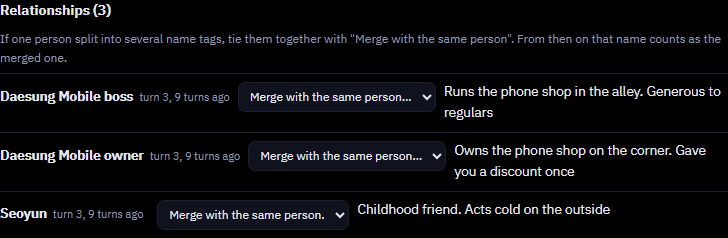
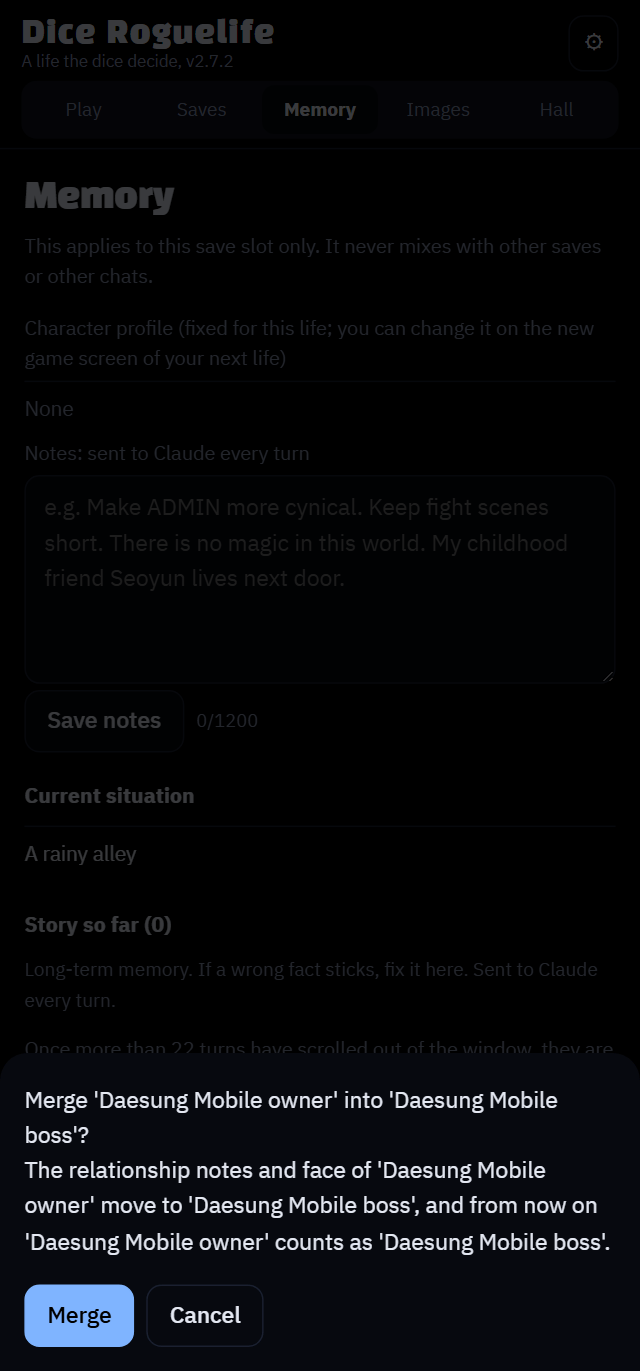
미리 막으려면 새 게임의 세계관, 등장인물 칸에 이름을 정해 두고, 한 이름으로만 부르도록 적어 두세요 (위 "내 설정으로 시작" 참고).
To prevent it, settle the names in Setting and characters when you start a new game and ask for one name per person (see "Start with your own setup" above).
防ぐには、新しいゲームを始めるときに世界観と登場人物で名前を決めておき、一人につき名前はひとつにするよう頼んでください(上の「自分の設定で始める」を参照)。
2. 판정이 이상하게 서술돼요
2. A check is narrated strangely
2. 判定の語られ方がおかしい
가끔 주사위 결과와 이야기가 맞지 않아서 어색할 때가 있어요. 그럴 땐 /판정으로 이유를 물어보세요. 규칙에 어긋났다면 AI가 바로잡을 수 있어요. 계속 신경 쓰이면 주사위를 끄고 시작하는 방법도 있어요.
Sometimes the dice result and the story don't line up. Ask why with /why; if it broke the rules, the AI can fix it. If it keeps bothering you, start a life with the dice off.
ダイスの結果と物語がかみ合わないことがあります。/why で理由を聞いてください。ルールに反していれば、AIが直せます。どうしても気になるなら、ダイスをオフにして人生を始めてください。
3. 저장 공간이 가득 찼어요
3. Storage is full
3. 保存容量がいっぱい
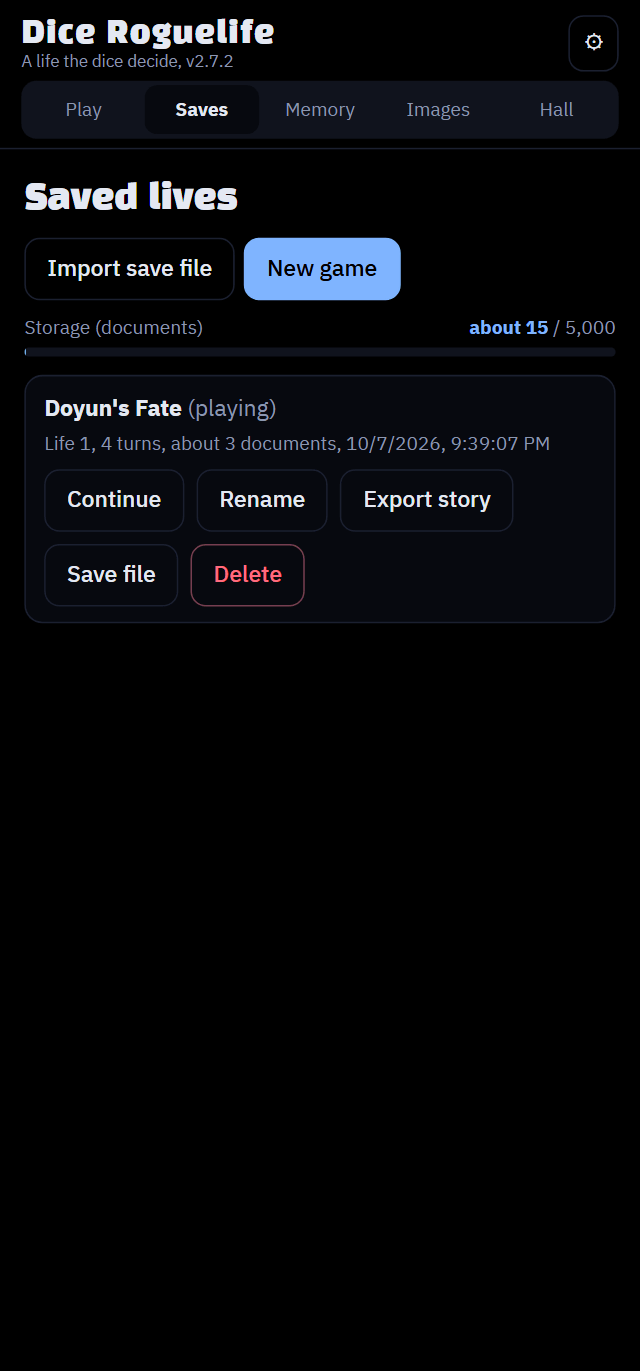
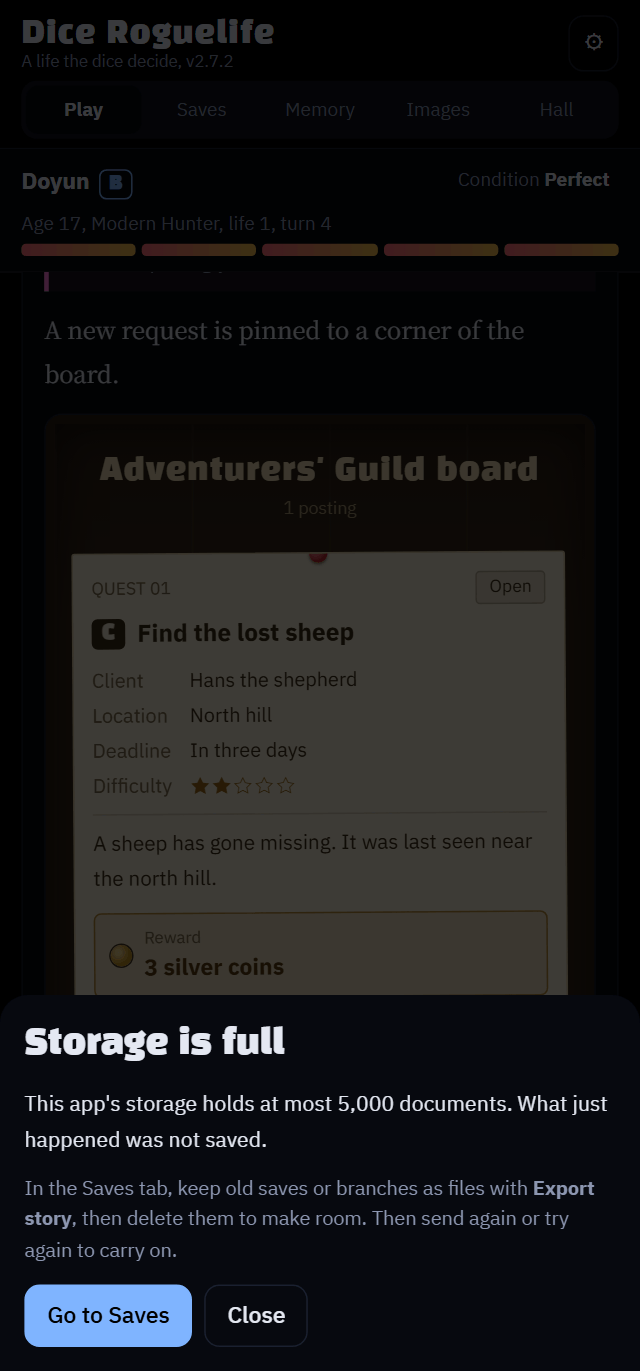
- 저장 탭에서 오래된 저장이나 분기를 이야기 내보내기로 파일에 담아 둔 다음 삭제하면 공간이 생겨요.
- In the Saves tab, export old saves or branches with Export story, then delete them to free up space.
- セーブタブで、古いセーブや分岐を物語の書き出しで書き出してから削除し、空きを作ってください。
그 밖의 제약
Other limits
そのほかの制限
- claude.ai 아티팩트에서만 돌아가요. 일반 웹사이트로 열면 AI를 부를 수 없어요.
- 저장은 그 아티팩트에 묶여 있어요. 업데이트할 때는 항상 같은 링크에 덮어쓰기로 하세요.
- 이미지는 아티팩트마다 따로 저장돼요. 새 링크로 옮기면 다시 올리거나 팩 내보내기 파일을 쓰세요.
- 이미지 업로드는 앱 소유자만 할 수 있어요. 게시된 링크에서 열어 주세요.
- 사용량 한도는 Anthropic이 정해요. 한도에 자주 걸리면 최근 기억 분량을 줄여 보세요.
- Runs only as a claude.ai artifact. Opened as a normal website, it can't call the AI.
- Saves are tied to that artifact. Always update by overwriting the same link.
- Images are stored per artifact. When you move to a new link, upload them again or use an Export pack file.
- Only the app's owner can upload images. Open it from the published link.
- Anthropic sets the usage limits. If you hit them often, lower the Recent memory size.
- claude.ai のアーティファクトでのみ動きます。普通のWebサイトとして開くとAIを呼び出せません。
- セーブはそのアーティファクトに紐づいています。アップデートは必ず同じリンクに上書きしてください。
- 画像はアーティファクトごとに保存されます。新しいリンクに移るときは、アップロードし直すかパックを書き出すのファイルを使ってください。
- 画像をアップロードできるのはアプリのオーナーだけです。公開されたリンクから開いてください。
- 利用上限はAnthropicが決めます。よく上限に達するなら、最近の記憶の量を減らしてください。
문제를 찾았나요?
Found a problem?
問題を見つけたら
github.com/wonjoonSeol-WS/dice-roguelife/issues에 남겨 주세요. 아래 내용을 함께 적어 주시면 더 빨리 확인할 수 있어요.
- 버전은 ⚙ 설정 맨 위의 "버전 v숫자"에서 확인해요 (지금은 v2.7.2).
- 재현 순서는 똑같이 따라 하면 문제가 다시 나오는 순서를 적어 주세요. 저장 파일을 첨부해 주셔도 돼요 (저장 탭 → 저장 파일 버튼으로 내려받아요).
- 스크린샷은 캡처 모드를 켜고 찍으면 이름이 가려져요.
Report it at github.com/wonjoonSeol-WS/dice-roguelife/issues. These details help get it looked at faster:
- Version: shown at the top of ⚙ Settings as "Version v…" (currently v2.7.2).
- Steps to reproduce: the steps that make the problem happen again. You can also attach a save file (Saves tab → Save file).
- Screenshots: turn on capture mode first to hide names.
github.com/wonjoonSeol-WS/dice-roguelife/issues で報告してください。次の情報があると早く確認できます:
- バージョン:⚙ 設定のいちばん上に「バージョン v…」と表示されます(現在 v2.7.2)。
- 再現手順:問題がもう一度起きる手順です。セーブファイルを添付することもできます(セーブタブ → セーブファイル)。
- スクリーンショット:先にキャプチャモードをオンにして名前を隠してください。